

A drop-in replacement for PHP's default session handler which stores session data in a MySQL database, providing better performance, better security and protection against session fixation and session hijacking






Session support in PHP consists of a way to preserve information (variables) on subsequent accesses to a website's pages. Unlike cookies, variables are not stored on the user's computer. Instead, only a session identifier is stored in a cookie on the visitor's computer, which is matched up with the actual session data kept on the server, and made available to us through the $_SESSION super-global. Session data is retrieved as soon as we open a session, usually at the beginning of each page.
By default, session data is stored on the server in flat files, separate for each session. The problem with this scenario is that performance degrades proportionally with the number of session files existing in the session directory (depending on the server's operating system's ability to handle directories with numerous files). Another issue is that session files are usually stored in a location that is world readable posing a security concern on shared hosting.
This is where Zebra Session comes in handy - a PHP library that acts as a drop-in replacement for PHP's default session handler, but instead of storing session data in flat files it stores them in a MySQL database, providing better security and better performance.
Zebra Session is also a solution for applications that are scaled across multiple web servers (using a load balancer or a round-robin DNS) where the user's session data needs to be available. Storing sessions in a database makes them available to all of the servers!
Supports "flash data" - session variables which will only be available for the next server request, and which will be automatically deleted afterwards. Typically used for informational or status messages (for example: "data has been successfully updated").
This class was inspired by John Herren's code from the Trick out your session handler article (now only available on the Internet Archive) and Chris Shiflett's code from his book Essential PHP Security, chapter 8, Shared Hosting, Pg. 78-80.
Zebra Session's code is heavily commented and generates no warnings/errors/notices when PHP's error reporting level is set to E_ALL.
Starting with version 2.0, Zebra Session implements row locks, ensuring that data is correctly handled in a scenario with multiple concurrent AJAX requests.
Citing from Race Conditions with Ajax and PHP Sessions, a great article by Andy Bakun:
When locking is not used, multiple requests (represented in these diagrams as processes P1, P2 and P3) access the session data without any consideration for the other processes and the state of the session data. The running time of the requests are indicated by the height of each process's colored area (the actual run times are unimportant, only the relative start times and durations).
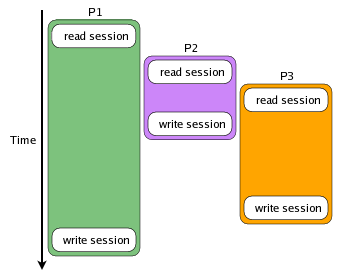
In the example above, no matter how P2 and P3 change the session data, the only changes that will be reflected in the session are those that P1 made because they were written last. When locking is used, the process can start up, request a lock on the session data before it reads it, and then get a consistent read of the session once it acquires exclusive access to it. In the following diagram, all reads occur after writes:
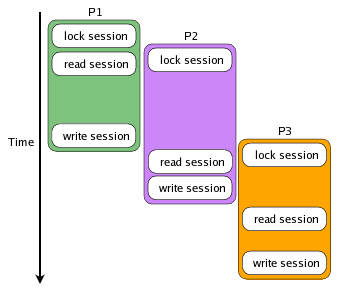
The process execution is interleaved, but access to the session data is serialized. The process is waiting for the lock to be released during the period between when the process requests the session lock and when the session is read. This means that your session data will remain consistent, but it also means that while processes P2 and P3 are waiting for their turn to acquire the lock, nothing is happening. This may not be that important if all of the requests change or write to the session data, but if P2 just needs to read the session data (perhaps to get a login identifier), it is being held up for no reason.
So, in the end, this is not the best solution but still is better than nothing. The best solution is probably a per-variable locking. You can read a very detailed article about all this in Andy Bakun's article Race Conditions with Ajax and PHP Sessions.
Thanks to Michael Kliewe who brought this to my attention!
-
acts as a wrapper for PHP's default session handling functions, but instead of storing session data in flat files it stores them in a MySQL database, providing better security and better performance
-
it is a drop-in and seamless replacement for PHP's default session handler: PHP sessions will be used in the same way as prior to using the library; you don't need to change any existing code!
-
integrates seamlessly with PDO (if you are using PDO) but works perfectly without it
-
implements row locks, ensuring that data is correctly handled in scenarios with multiple concurrent AJAX requests
-
supports read-only sessions which take no row lock at all, so a request that only needs to read session data - like a polling AJAX call - doesn't have to sit and wait for a long running request to release the session
-
because session data is stored in a database, the library represents a solution for applications that are scaled across multiple web servers (using a load balancer or a round-robin DNS)
-
sessions can optionally be tied to the visitor's IP address, and what counts as "the visitor's IP address" can be a callable of your own - which is what makes this usable behind a load balancer or a proxy, where the address the server sees is not the visitor's
-
has awesome documentation
-
the code is heavily commented and generates no warnings/errors/notices when PHP's error reporting level is set to E_ALL
Your support means a lot and it keeps me motivated to keep working on open source projects.
If you like this project please ⭐ it by clicking on the star button at the top of the page.
If you are feeling generous, you can buy me a coffee by donating through PayPal, or you can become a sponsor.
Either way - Thank you! 🎉
I also run PageDrop — if you need a fast, professional website for your business, check it out.


Check out the awesome documentation!
PHP 5.6.40+ with either the mysqli or pdo_mysql extensions activated, MySQL 5.5.3+
Composer declares 7.4 as the minimum - the oldest PHP the test suite is actually run on. The library itself still works
on 5.6.40, checked on every release by linting and smoke-testing it on that version (tests/run-legacy.sh) and
statically with composer check-compat-legacy. If you are on a PHP older than 7.4, install by downloading the release rather than through Composer.
You can install via Composer
# get the latest stable release
composer require stefangabos/zebra_session

# get the latest commit
composer require stefangabos/zebra_session:dev-master
Or you can install it manually by downloading the latest version, unpacking it, and then including it in your project
require_once 'path/to/Zebra_Session.php';Notice a directory called install containing a file named session_data.sql. This file contains the SQL code that will create a table that is used by the class to store session data. Import or execute the SQL code using your preferred MySQL manager (like phpMyAdmin or the fantastic Adminer) into a database of your choice.
Note that this class assumes that there is an active connection to a MySQL database and it does not attempt to create one!
<?php
// first, connect to a database containing the sessions table
// either by something similar to
//
// $link = mysqli_connect(host, username, password, database);
//
//  or by using PDO
//
//  try {
//      $link = new PDO(
//      'mysql:host=' . $host . ';dbname=' . $database . ';charset=utf8mb4', $username, $password, array(
//         PDO::ATTR_ERRMODE   =>  PDO::ERRMODE_EXCEPTION,
//      ));
// } catch (\PDOException $e) {
//     throw new \PDOException($e->getMessage(), (int)$e->getCode());
// }

// include the Zebra_Session class
// (you don't need this if you are using Composer)
require 'path/to/Zebra_Session.php';

// instantiate the class
// this also calls session_start()
$session = new Zebra_Session($link, 'sEcUr1tY_c0dE');

// from now on, use sessions as you would normally
// this is why it is called a "drop-in replacement" :)
$_SESSION['foo'] = 'bar';

// data is in the database!The test suite is not part of the released package - if you want to run it you need a git checkout of the repository.
The tests run against a real MySQL instance, creating and dropping their own table in a database of their own, so point them at a server you are happy for them to write to.
composer install

# copy the defaults and put your connection details in the copy (it is git-ignored)
cp tests/phpunit.xml.dist tests/phpunit.xml

tests/run-tests.sh
With no arguments it runs the suite and then the compatibility, static analysis and coding standard checks.
Give it any argument and it runs only the tests you asked for. PHP picks the interpreter, which is useful
for checking the suite against another version:
tests/run-tests.sh --testdox                    # readable output
tests/run-tests.sh --filter Locking             # only tests matching "Locking"
tests/run-tests.sh LockingTest.php              # a single file
tests/run-tests.sh --group regression           # every test guarding a past fix
tests/run-tests.sh --static                     # the checks too, whatever else was given
PHP=/path/to/php7.4/bin/php tests/run-tests.sh  # a specific interpreter
On Windows use tests\run-tests.bat, which does the same things in the same order.
The suite needs PHP 7.4 or newer. tests/run-legacy.sh is what checks the library still works on 5.6.40 - it lints
everything that ships and round-trips one session on that version in a container, so it needs Docker running:
tests/run-legacy.sh         # lint, then the smoke test
tests/run-legacy.sh --lint  # the lint alone, which needs no database
Coverage is not produced on an ordinary run. Asking for it requires either pcov or Xdebug:
composer test-coverage # writes tests/coverage-html