The tool to create dashboards for customers. Uses React on UI layer, NodeJS Express on the backend layer.
The tool is created to speed up the UI development for each customer. To create a customer specific dashboard, clone this repository, setup jobs, setup widgets, test and deploy to customer specific URL.
The deployment can be done either locally on the customer premise or in the cloud.
See below the explanation of main architecture, flows, jobs and widgets.
The frameworks is based on the following concepts:
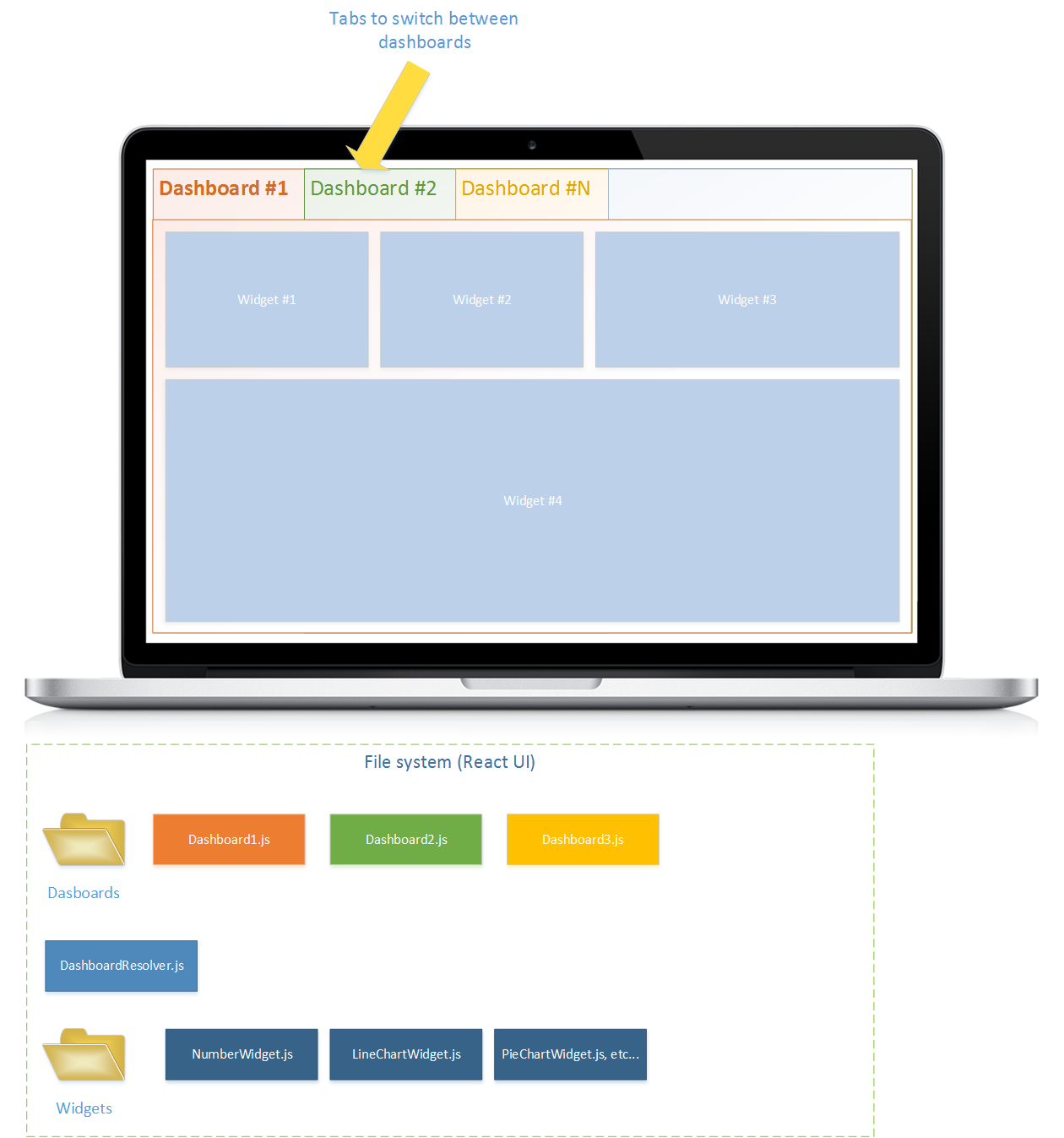
Jobs- the main working object, executed on schedule or on MQTT event, fetches the data from the mackend, maps and reduses the data based on target widget data template, sends the fetched data to widget over socket.io clientWidget- the representation of the data on the UI. Each widget is subscribed to certaindata_id- a string with the identifier where eachJobpushes the data to. OnceJobpushed the data withsendEvent(dataId, payload)method, the widget receives the messages with samedataIdand refreshes the own representation.Dashboard- a single dashboard that is defined to be displayed on one page. Developer can create multiple dashboards for application, set names for them, then the application displays them in different tabs where user can switch between.
Widgets can be of a different type:
- Number
- Text
- Line chart
- Bar Chart
- Pie Chart
- Generic HTML Widget - the widget that accepts data ID and calls
render()method, developer needs to define render method. - etc.. (to be extended based on customer needs)
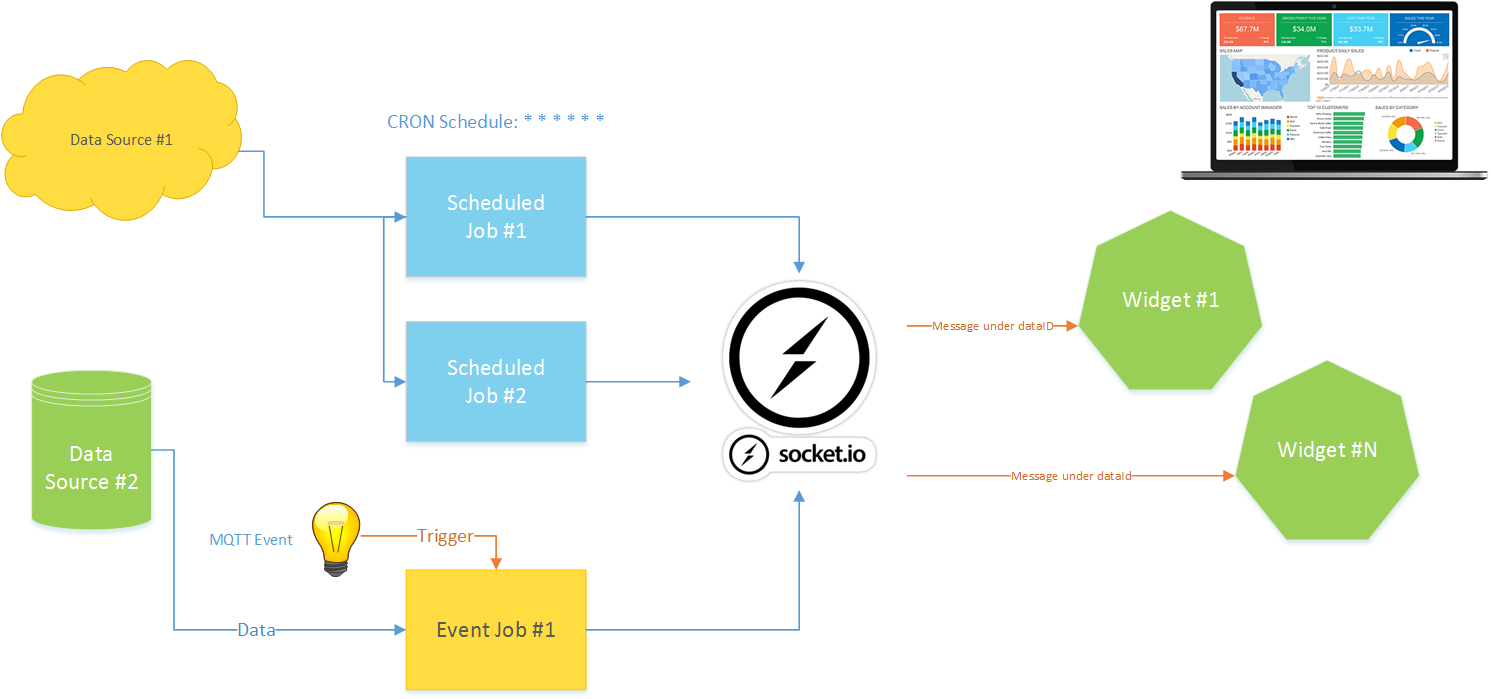
Jobs and Socket.IO server are running on Express Node.JS application. The same application is hosting React-based UI layer which is subscribed for Socket.IO Events
- Node JS as main running environment
- Express for hosting React UI layer and management API
- React JS for developing the UI layer
- Bootstrap 4.0 for layout and main css style;
- React grid layout (https://github.com/STRML/react-grid-layout) for building up layout of dashboard;
- AG Data Grid for data table display;
- Fontawesome 5.0 for icons;
- React i18Next for internationalization;
- React charts (http://recharts.org/) for chart widgets;
- Node Schedule to run jobs on schedule (https://github.com/node-schedule/node-schedule)
- MQTT for Node JS to subscribe for MQTT broker messages (https://www.npmjs.com/package/mqtt);
There are two types of jobs:
ScheduleJob- runs on schedule. When creating job, derived fromScheduleJobclass, override methodgetSchedule()and return desired Cron format string: (* * * * * *) describing the needed schedule. Once per second is the minimal.MqttEventJob- runs on MQTT event. When creating job derived from theMqttEventJob, override the methodgetTopics()that rerurns the array of topics that the job need to subscribe to. Acceptrs all MQTT wildcard formats too:['topic1/#', 'topic2/event1', ...]
If mentioned methods are not overwritten, the exception is thrown on the application start.
To start application locally execute
npm setup
npm run server
npm run client
npm run server and npm run client runs both backend and UI under different ports. Test UI application in http://localhost:3000. Then navigate to http://localhost:5000. If you have environment variable PORT defined, navigate to this port on localhost host.
To build for production, execute
npm run build
It will build up react application from client folder and copy the build result to public folder of the backend. Then you can publish the content of the application excluding client folder to the server.
To start application for production mode run
npm run start:production
It will build up react client, copy the build result into express public folder and starts the express backend at the default PORT or 5000.
Note that
run()method for the job executes only once on server start.
/src
job-runner.js- this class resolves all jobs available in\jobsfolder and starts them.
/src/base
job.js- base job class. Subscribes for socket.io and ready to send the signal on demand.schedule-job.js- the job that executes on schedule.mqtt-job.js- the jobs that is subscribed for MQTT broker topics and fires every time the desired MQTT message arrives.
The generic job that has run() method and is a base class for all other jobs. On server start the job-runner executes the run() method for all resolved jobs. The run() method is executed only once.
The exception is thrown if run() method is not implemented.
Method initializeAsync() is called before run() and needs to return a Promise. The execution of the job is blocked before the returned promise is resolved.
The ScheduleJob class is using node-schedule to execute jobs on desired time intervals using CRON string format (see below in schedule job sample.
The job-runner calls run() method for this type of jobs, the run() method instantiates the scheduler and runs the method onSchedule() in desired schedule. The desired schedule is defined and returned in the method getSchedule() which should be implemented in child classes.
The MqttMessageJob executes every time the MQTT message is broadcasted to the topics it subscribed to. It uses mqtt module to connect to the MQTT broker and subscribe to the list of topics.
On run() method call by job-runner it establish the MQTT connection and subscribed for topics. AWhen message arrives, the onMessage(topic, message) method is called.
jobs/sample-job.js is created to demonstrate the generic job flow.
Developer must overwrite run() method of the generic job when it is extended from Job class. This method can do anything to fetch the data and when data is ready, it needs to call this.sendEvent(dataId, payload) method with necessary data ID and fetched data. This will be sent to widgets.
It is also possible to override method initializeAsync() that must return Promise. In this method developer can define initialization activities, the run() method will never be run before the initializeAsync() is finished.
jobs/sample-schedule-job.js is created to demonstrate the schedule job flow.
This class needs to be derived from ScheduleJob class in src/base/schedule-job.js module. The methods that are must be implemented are:
getSchedule()- returns a CRON format string for desired schedule.
*    *    *    *    *    *
┬    ┬    ┬    ┬    ┬    ┬
│    │    │    │    │    │
│    │    │    │    │    └ day of week (0 - 7) (0 or 7 is Sun)
│    │    │    │    └───── month (1 - 12)
│    │    │    └────────── day of month (1 - 31)
│    │    └─────────────── hour (0 - 23)
│    └──────────────────── minute (0 - 59)
└───────────────────────── second (0 - 59, OPTIONAL)
Example: * */5 * * * * - execute the job every 5 minutes.
onSchedule()- this method is executed on schedule. Fetch the data here and then callsendEvent(dataId, data)to update widgets on schedule.
If the above methods are not implemented, the exception will be thrown.
jobs/sample-mqtt-job.js contains a class that implements the base MqttMessageJob class (src/base/mqtt-job.js).
The class must implement following methods:
getMqttBrokerUri()- needs to return a string with the MQTT broker address. Must include the protocol as well. For instance:mqtt://mqtt.intelligentpackaging.online;getListOfTopics()- must return the array of topics the job needs to subscribe to. The array must be an array of strings. For instabce:['topic1', 'topic2/#', 'topic3/eventType1/value'];onMessage(topic, message)- is executed every time the MQTT message arrives.topicis a string with the topic that fired the event.messageis aBufferthat contains arrived message payload.
The following methods are executed one after another but never at the same time.
initializeAsync()-Promiseto execute initialization steps.run()- execute the job