
Contributed by Tiffany Nguyen, Christine Nguyen, Jia Cherng Ng, Mohammad Sleiman
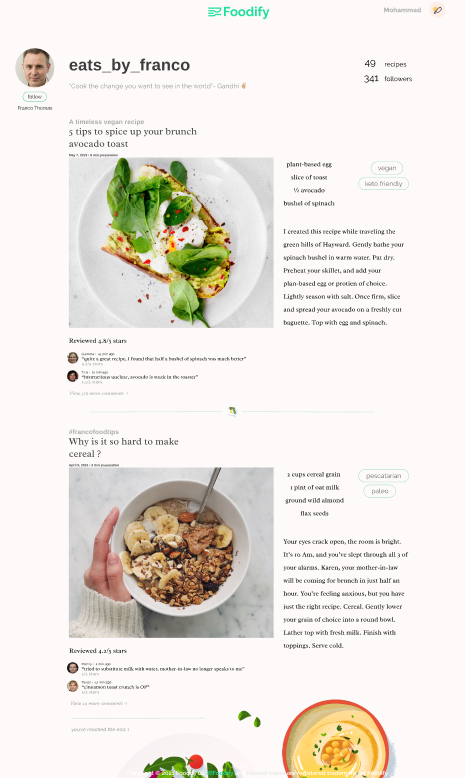
Foodify.us is a web application to get recipe recommendations based on users’ diet preferences, restrictions, calorie limit and etc. Foodify.us provides a platform for experienced and novice culinary enthusiasts alike to share their recipes and build a following through user account following, and get feedback through users' recipe comment reviews and ratings. The center of the user experience is a Discovery Feed, a culmination of recipes based on user interactions and who they follow.
Foodify is built primarily on React and NodeJS


Firebase Authentication from Web Dev Simplified Tutorial: https://youtu.be/PKwu15ldZ7k
Two terminals need to be open in order to run the application. For both terminals, change the directory to the frontend "cd frontend", then:
-
Terminal 1: Type "nodemon server"
-
Terminal 2: Type "npm start"
Download Node.js: https://nodejs.org/en/download/
npm install
npm install cors --save
npm install -g nodemon
npm install --save react-router-dom
npm install react-bootstrap@next bootstrap@5.1.0
npm install @material-ui/core
npm install @material-ui/icons
npm install react-google-login
npm i firebase@^8.10.0
npm i --save material-ui-search-bar
npm install react-bootstrap-dropdown-menu --save
npm install @aws-sdk/client-s3
npm install --save react-toastify
Create a folder in your user on any OS called: .aws. This is what it should look like:

Please create a file on Notepad with these credentials inside:
[default]
aws_access_key_id=AKIA2SODDWRKSJ3KYGF3
aws_secret_access_key=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
When saving this file, follow this: https://www.techwalla.com/articles/how-to-create-a-file-without-an-extension-with-notepad. Save this file as "credentials"
Please read over frontend/README.md