




| WinExternal is a project that compiles several Microsoft offline installers for Windows, into one silent, unattended launcher. | WinExternal es un proyecto que recopila varios instaladores fuera de línea de Microsoft para Windows, en un lanzador desatendido y silencioso. |
| File | OS | Size |
|---|---|---|
| WinExternal.exe (.zip) | Windows 7/10/11 x86 x64 | 1.12 GB |
| Disable your Antivirus, Antimalware, SmartScreen or any other security solution in your Operating System, close all windows and check the date and time of your PC is correct. Download WinExternal.exe (.zip), unzip it to your desktop, execute it with double click (accept privileged execution) and follow the instructions on the screen. | Desactive su Antivirus, Antimalware, SmartScreen o cualquier otra solución de seguridad en su Sistema Operativo, cierre todas las ventanas y verifique que la fecha y hora de su PC sea la correcta. Descargue WinExternal.exe (.zip), descomprímalo en el escritorio, ejecútelo con doble clic (acepte la ejecución con privilegios) y siga las instrucciones en pantalla. |
Note: This is requested because this project uses batch scripts packaged into a .exe, and antivirus software may flag this as a false positive. If in doubt, you can unzip the .exe and audit the scripts, run the packages manually, or choose not to use this project.
Nota: Esto se solicita porque este proyecto usa scripts batch empaquetados en un .exe, y los antivirus pueden detectarlo como falso positivo. Si tiene dudas, puede descomprimir el .exe y auditar los scripts, ejecutar los paquetes manualmente, o no usar este proyecto.
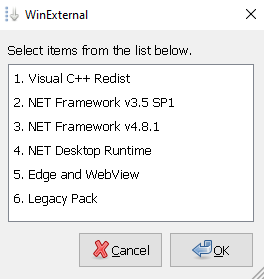
| WinExternal contains standalone packages. Select the one of your preference. | WinExternal contiene paquetes independientes. Seleccione el de su preferencia. |
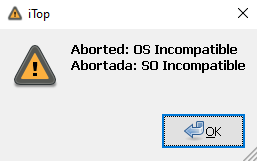
| All packages are supported on Windows 10/11 x64 only, except Legacy, which is supported on Windows 7 x86 only and whose components have reached End-of-Life (EOL) / End-of-Support (EOS). Backward compatibility with previous versions of Windows 10/11 22H2 or Windows Server versions is not guaranteed. If your OS does not support the component you selected, the following window will appear: | Todos los paquetes son compatibles únicamente con Windows 10/11 x64, excepto Legacy, que es compatible solo con Windows 7 x86 y cuyos componentes han alcanzado el End-of-Life (EOL) / End-of-Support (EOS). No se garantiza retro-compatibilidad con versiones anteriores de Windows 10/11 22H2 o versiones Windows Server. Si su SO no es compatible con el componente que ha seleccionado, saldrá la siguiente ventana: |
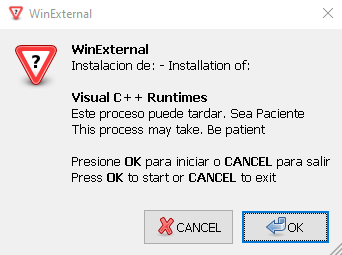
- Microsoft Visual Basic/C++ Runtime x86 - 1.1.0 (EOS)
- Microsoft Visual C++ 2005 Redistributable x86 x64 - 8.0.61187 (EOS)
- Microsoft Visual C++ 2008 Redistributable x86 x64 - 9.30729.7523 (EOS)
- Microsoft Visual C++ 2010 Redistributable x86 x64 - 10.0.40219 (EOS)
- Microsoft Visual C++ 2012 Redistributable x86 x64 - 11.0.61135 (EOS)
- Microsoft Visual C++ 2013 Redistributable x86 x64 - 12.0.40664 (EOS)
- Microsoft Visual C++ 2026 Redistributable x86 x64 - 14.51.36247 (Active Support)
- Microsoft Visual Studio 2010 Tools for Office Runtime x86 x64 - 10.0.609922 (EOS)
- Microsoft Visual Studio Tools for Applications 2017 x86 x64 - 15.0.36010 (Active Support)
- Microsoft Visual Studio Tools for Applications 2019 x86 x64 - 16.0.35907 (Active Support)
- Microsoft Visual Studio Tools for Applications 2022 x86 x64 - 17.1.37110 (Active Support)
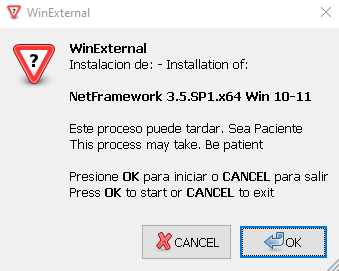
- Microsoft .NET Framework v3.5 SP1 (for Windows 10/11 22H2 or Later) (Active Support)
|
|
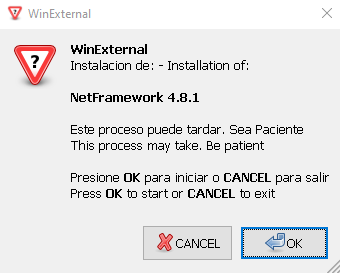
- Microsoft .NET Framework Runtime 4.8.1 - 4.8.9037.6 (for Windows 10/11 20H2 or Later) (Active Support)
|
|
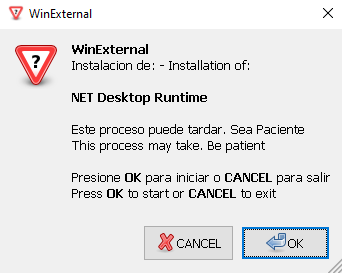
- Microsoft .NET 6.0.36 Desktop Runtime x64 LTS (EOS)
- Microsoft .NET 8.0.28 Desktop Runtime x64 LTS (Active Support)
- Microsoft .NET 10.0.9 Desktop Runtime x64 LTS (Active Support)
check with / verifique con:
dotnet --info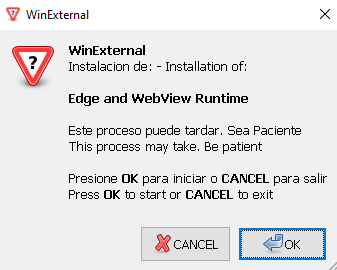
- Microsoft Edge for Business x64 - 149.0.4022.98 (Active Support)
- Microsoft Edge WebView2 Evergreen Standalone Installer x64 - 149.0.4022.98 (Active Support)
| Edge and WebView2 are now pre-installed on most devices running Windows 10 or higher, are automatically updated, and are integrated as a core component of the operating system, so they do not support uninstallation by traditional methods. Selecting this option from the WinExternal selector menu will only install these components, if they do not exist on your operating system. Check Feedback. | Edge y WebView2 ahora vienen instalados en la mayoría de los dispositivos con Windows 10 o superior, se actualizan automáticamente y se integran como un componente esencial del sistema operativo, por tanto no admiten desinstalación por métodos tradicionales. Si selecciona esta opción en el menú selector de WinExternal, solo instalará estos componentes en caso de que no existan en su sistema operativo. Verifique Feedback. |
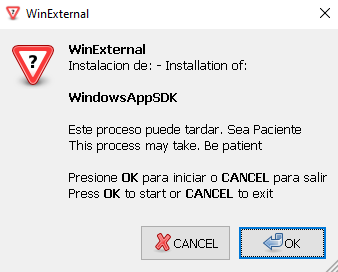
- Windows App SDK 2.2.0 Installer x64 (Active Support)
| Check version with: | Comprobar versión con: |
Get-AppxPackage -AllUsers *WindowsAppRuntime* | Select-Object Name, Version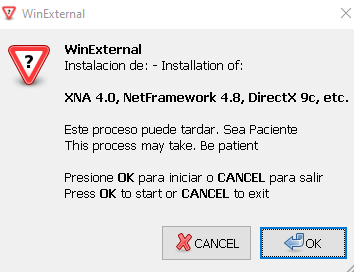
- Microsoft Directx End-User Runtimes - 9.29.1974.1 (EOS)
- Microsoft .NET Framework Runtime v4.8 - 4.8.4115.0 ENU | 4.8.3761.0 ESN (Active Support)
- Microsoft Visual J# Version 2.0 Redistributable Package - Second Edition (x86 x64) (EOS)
- Microsoft Visual Studio 2010 F# 2.0 SP1 (EOS)
- Microsoft XNA Framework Redistributable v4.0 - 4.0.20823.0 (EOS)
| WinExternal sends information to the developer, only for the purpose of verifying that the installation has been completed successfully. This information is used exclusively for statistical purposes and to improve the installer, without collecting personal data or compromising user privacy. Example: | WinExternal envía información al desarrollador, únicamente con el propósito de verificar que la instalación se haya completado de manera exitosa. Esta información se utiliza exclusivamente para fines estadísticos y de mejora del instalador, sin recopilar datos personales ni comprometer la privacidad del usuario. Ejemplo: |
Package Installation
Hostname=DESKTOP-AJ4JSC8
User=Usuario
Date=wed. 13/11/2024 Time= 6:44:17,39
Status=Installed
Package: WinExternal- 7zSFX Builder
- curl for Windows
- iconarchive
- icon-icons
- Microsoft DirectX End-User Runtime
- Microsoft Edge Enterprise
- Microsoft Edge WebView2 Runtime
- Microsoft .NET Desktop Runtime
- Microsoft NetFramework Runtime
- Microsoft Visual C++ Runtime
- Microsoft Visual J# Redistributable Package 2.0
- Microsoft Visual Studio 2010 F# 2.0
- Microsoft Visual Studio Tools for Application 2017
- Microsoft Visual Studio Tools for Application 2019
- Microsoft Visual Studio Tools for Application 2022
- Microsoft XNA Framework Redistributable
- RapidCRC Unicode
- vcredist
- Windows App SDK
- WinZenity
|
|
| This project uses a dual-licensing model to balance software freedom with content protection: | Este proyecto utiliza un modelo de licencia dual para equilibrar la libertad del software con la protección del contenido: |
| Content | Licensed Under |
|---|---|
| Scripts, Binaries, Infrastructure |  |
| RAG, Workers, Specialized Modules, Docs |  |
THE SOFTWARE IS PROVIDED "AS IS", WITHOUT WARRANTY OF ANY KIND, EXPRESS OR IMPLIED, INCLUDING BUT NOT LIMITED TO THE WARRANTIES OF MERCHANTABILITY, FITNESS FOR A PARTICULAR PURPOSE AND NONINFRINGEMENT. IN NO EVENT SHALL THE AUTHORS OR COPYRIGHT HOLDERS BE LIABLE FOR ANY CLAIM, DAMAGES OR OTHER LIABILITY, WHETHER IN AN ACTION OF CONTRACT, TORT OR OTHERWISE, ARISING FROM, OUT OF OR IN CONNECTION WITH THE SOFTWARE OR THE USE OR OTHER DEALINGS IN THE SOFTWARE.