
Transforming Organisational Docs using Doc AI Agent
- Phase 1 — Exploration & Learning
- Week 2 — PoC: Content Comparison
- Week 3 — PoC: AI Document Agent
- Week 4 — Team PoC: Travel Planner Agent (Planning)
- Week 5 — Team PoC: Travel Planner Agent (Build) + Project Kickoff
- Week 6 — Project: Architecture & Design
- Week 7 — Project: Implementation and Review
- Week 8 — Project: Implementation and Review
- Week 9 — Project: Implementation and Review
- Week 10 — Project: Implementation and Review
- Week 11 — Project: Implementation and Review
- Week 12 — Project: Implementation and Review
- Week 13 — Project: Implementation and Review
- Week 14 — Project: Implementation and Review
- Week 15 — Project: Implementation and Review
- Week 16-17 — Project: Implementation and Review
2/18/2026 – 3/4/2026
- Explored and understood the core technologies involved in the project.
- Mentor shared curated resources and links to get familiar with the stack.
| Area | Topics |
|---|---|
| AI/ML | LLMs, Agentic AI Development |
| Language | Python |
| Integration | API Clients, MCP Servers & Tools |
Build foundational understanding of all key technologies before starting hands-on work.
3/5/2026 – 3/11/2026
- Reviewed and discussed topics from Phase 1.
Build a small PoC that compares content from two sources and lists similar content using an LLM.
Requirements:
- Use Gemini and Ollama based LLM models
- Each team member builds independently
Each team member individually implemented a RAG-based project for content comparison using sources such as:
- GitHub repositories
- Jira tickets
- Local file documents
3/12/2026 – 3/18/2026
- Reviewed and discussed the content comparison PoC from Week 2.
Build a small PoC for an AI Agent that reads documents from various sources.
Requirements:
- Use LangChain Framework
- Integrate tools with an LLM
Each team member independently built an AI Agent with access to multiple tools, including:
- GitHub document reader
- Jira document reader
- Document summarisation tool
Understand tool integration with LLM agents using the LangChain framework.
3/18/2026 – 3/25/2026
- Reviewed Week 3 agents — discussed how agents work and what tools are.
- Kicked off first team project.
Build a Travel Planner AI Agent using an MCP Server.
Agent Capabilities:
- Search Flights
- Search Hotels
- Search Places
- Get Weather Information
- Optimise results based on Budget
3/25/2026 – 4/1/2026
Collaborated as a team and delivered the Travel Planner Agent.
Team Split:
| Sub-team | Responsibility |
|---|---|
| Team A | Travel AI Agent |
| Team B | MCP Server |
- Used FastMCP to build the MCP server.
Architecture Diagram:
Repo:
https://github.com/Dharshansk16/travel-planner
After completing the travel agent PoC, the mentor introduced the main project.
In large organisations like HPE, different teams use different documentation tools, leading to:
1. Data Fragmentation
- Docs scattered across multiple tools
- Miro → Diagrams & Architectures
- Figma → UI Designs
- WikiFlex → Project Docs
- Other internal documents
2. No Single Source of Truth Teams struggle with:
- Knowing what has recently changed
- Identifying which version of a document is current
- Locating all documents related to a project
Come up with a project plan and architecture for solving this problem.
Project: Event-Driven Knowledge Integration System using a Doc AI Agent
4/1/2026 – 4/8/2026
Architecture Diagram:
1. Webhook Integrations
- Miro (Webhook + REST API)
- Figma (Webhook)
- Confluence (Webhook)
2. Connectors Layer
- Each tool has a dedicated connector.
- Connectors publish only metadata (not full content) to the message broker — avoids queue overload.
- Webhooks signal that a specific entity has changed and needs to be updated.
3. Message Broker / Event Bus
- RabbitMQ or Kafka
- Pub/Sub model
4. Knowledge Service Layer
- Subscribes to events from the message queue.
- Fetches full content via REST APIs.
- Scheduled fetching to avoid API rate limits.
5. Data Normalisation
- Fetched data is normalised into a standard format before storage.
6. GitHub Integration
- Used as the central repository.
- Handles versioning of all normalised documents.
7. AI Agent + MCP Server
-
AI Agent correlates similar documents and groups them together.
-
MCP Server exposes tools to the agent:
- Fetch existing documents
- Perform similarity search
- Get similarity score
- If similar — update the path of the new/updated document to the relevant group
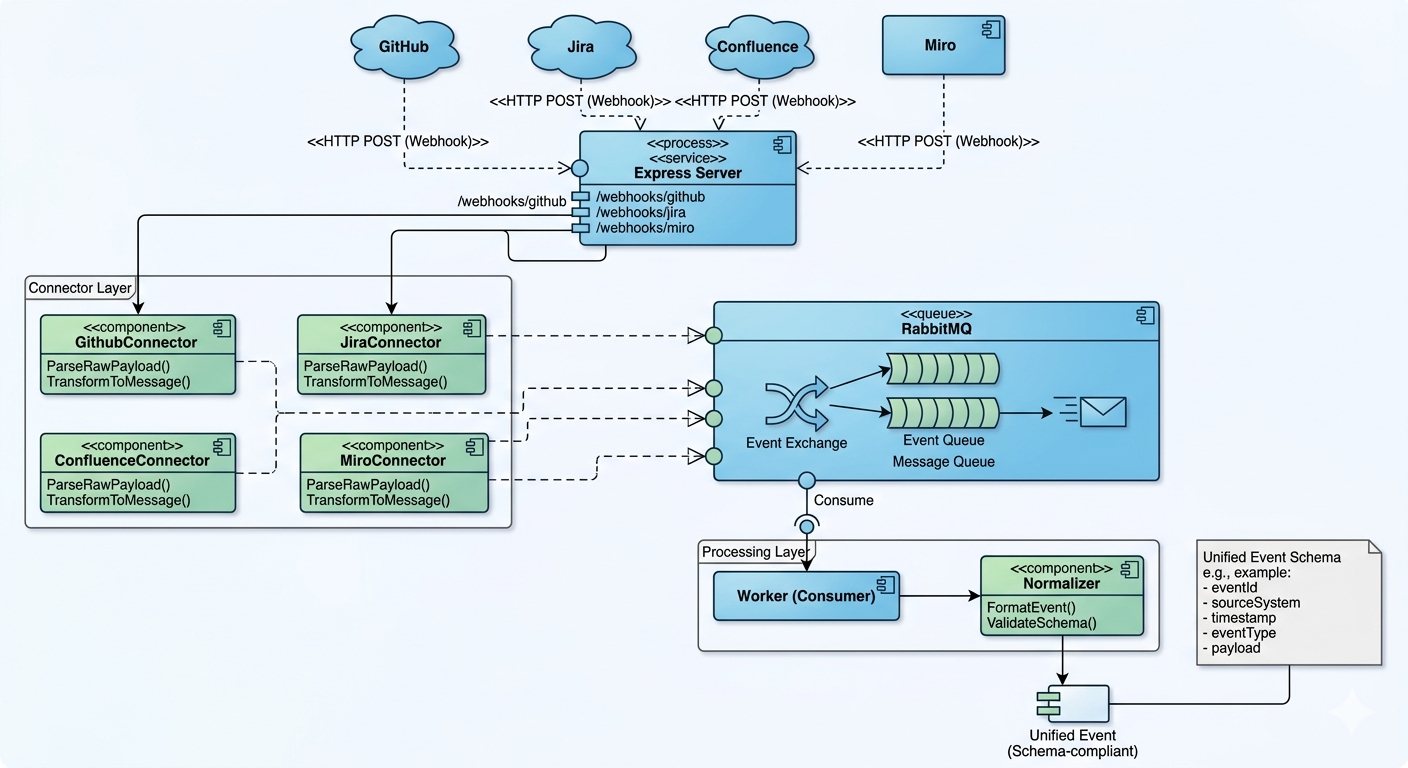
This image represents the initial working implementation of our proposed architecture.
It focuses on the first phase of the pipeline where webhook events are captured, processed, and routed through queues.
The objective was to validate real-time document sync, event flow, and service communication.
This serves as the foundation for the complete AI-powered knowledge integration system.
4/8/2026 – 4/22/2026
The meeting focused on planning and beginning implementation of the first project phase, specifically knowledge ingestion. The team discussed webhooks, connectors, message queues, normalization, and finalized the tech stack. The mentor advised starting implementation and presenting progress in the next meeting.
4/22/2026 – 4/29/2026
In Week 8, we presented the architecture for the classification component of the project to our mentor. The proposed approach begins by receiving normalized data and checking whether the document ID already exists. If it does, the system retrieves the corresponding group path and updates the existing document in the central GitHub repository.
For new documents, a vector search is performed against group centroids to identify relevant groups. Based on the confidence score:
High confidence leads to assigning the document to an existing group. Low confidence results in creating a new group for the document. Medium confidence (ambiguous cases) is handled using an agent with MCP for further resolution.
If the ambiguity persists even after LLM-based processing, the system falls back to human review.

4/29/2026 – 5/6/2026
This week focused on a checkpoint demo to showcase the progress made so far. Each team presented their respective contributions. Team 1 demonstrated the knowledge ingestion pipeline, covering the flow from webhooks to connectors, message queue handling, knowledge extraction via REST API, and the normalization process. Team 2 presented progress on the classification component, including project setup, logging configuration, database setup using PostgreSQL with pgvector, embedding model integration, and implementation of duplication checks along with vector search using confidence scores. The mentor reviewed and recorded the demos. Feedback for the next week included improving the normalization logic and presenting progress on MCP and agent development.
5/6/2026 – 5/13/2026
The core agent and workflow pipeline were successfully implemented and demonstrated. At this stage, MCP tools had been integrated and were functioning as expected within the workflow. We also demonstrated the progress made in the data ingestion pipeline. An example demo was shown to explain how documents with high correlation are directly classified using normal vector search. For documents with lower confidence scores, the agent takes over the classification process by leveraging MCP tools. One of the MCP tools demonstrated was the fetch_group_readme tool. Based on the identified group, this tool fetches the corresponding group README from the central GitHub store. The README contains a summary of the group, providing the LLM with additional context to improve document classification accuracy and determine the most relevant group for the document. The mentor reviewed the progress and advised us to complete the integration between the data ingestion pipeline and the agent workflow by next week.
5/13/2026 – 5/29/2026
Identified a key limitation in the current approach: as the number of documents in a group grows, the single centroid drifts toward the geometric centre of the embedding space and no longer represents the actual meaning of the group's documents. This makes cosine similarity search less accurate.
Current Implementation
- For every new normalised document, we first convert this to embedding and then do a cosine similarity search against the group centroids (mean of all doc embeddings of that group)
- fetch k similar groups that are closest and return to the llm for classification
Problem with the approach
- This above solution works well when number of docs in a group are less
- But if the number of docs in a group increases the centroid does not really reflect the actual meaning of the docs it comes down to the geometric centre
- During cosine similarity search the doc is not actually representing the correct meaning of the group
- Also having just one centroid per group will compress all the information into a 756 dim embedding.

Planned solution to the above problem
- Instead of having one centroid per group, we can have multiple medoids per group
- Plan here is to implement kmeans clustering across a group
- this approach will significantly improve the precision since the medoids will always be at the centre of the cluster representing the actual meaning of ther documents

5/29/2026 – 6/4/2026
What Was Done
- Presented a complete end-to-end demo of the project to the mentor. The demo used GitHub and Confluence as the two classification targets, walking through the full pipeline from document ingestion to classification. Explained the system architecture end-to-end, covering how documents are normalised, embedded, clustered using medoids, and classified via cosine similarity search.

Mentor Feedback
- Build a search interface using RAG on top of the current system, allowing users to query across the classified documents. Extend the classification to a higher-level folder structure — currently documents are only classified by source (GitHub / Confluence). The new requirement is to also classify each document by type: Requirements Design Troubleshooting
Next Steps
- Implement the higher-level document type classification layer (Requirements / Design / Troubleshooting) on top of the existing source-level classification. Build out the RAG-based search interface
6/4/2026 – 6/11/2026
Following the mentor's feedback from the previous review, we focused on building a Retrieval-Augmented Generation (RAG) search layer on top of the classified document repository.
To improve retrieval quality and scalability, we designed and implemented a three-layer retrieval architecture we also implemented reranking using cross encoder and citations backed response which source back to the actual documents for better relevance.
- Successfully built a production-ready RAG service capable of searching across classified organisational documents.
- Improved retrieval precision through Cross Encoder reranking.
- Enabled source-grounded answers with end-to-end document traceability.
6/11/2026 – 6/18/2026
This week focused on production readiness, deployment, and database scalability improvements.
- Dockerised the RAG service and deployed it on an Azure VM.
- Set up a PostgreSQL + pgvector read replica using WAL publication/subscription replication.
- Separated read-heavy RAG queries from write-heavy classification workloads.

- Improved system scalability, reliability, and performance by isolating retrieval traffic from document ingestion and classification operations.
6/11/2026 – 6/18/2026
This week focused on establishing a robust and automated CI/CD pipeline using GitHub Actions for the doc-query application. The primary goal was to streamline the deployment of the enterprise document transformer system to the Azure VM while ensuring code quality and application stability.
6/18/2026 – 7/3/2026
This two weeks we focused on enhancing the fault tolerance of the multi-source ingestion pipeline and significantly improving the contextual accuracy of our LLM responses.
Key Updates Eliminated Silent Data Loss: Integrated a robust Dead Letter Queue (DLQ) directly into the document ingestion pipeline. This resolves previous issues where transient API failures or unhandled exceptions within the ingestion and normalization consumers resulted in dropped data.
Resolved Split-Brain Inconsistencies: Used the new DLQ alongside the implementation of idempotent retries(was already implemented via github sha). This combination successfully fixes split-brain state inconsistencies, if the db or github write fails mid it can be replayed from the message queue.
Upgraded Retrieval Context Windowing: Enhanced the retrieval service to support context windowing. Instead of only feeding isolated exact-match chunks to the LLM, the service now provides the surrounding document chunks. Providing more accurate and complete context to the llm
7/3/2026 – 7/8/2026
we refactored the Doc AI Agent's backend, replacing the direct LLM response model with a modern streamable HTTP response mechanism. By streaming output chunks as they are generated, we drastically reduced the Time to First Token (TTFT), effectively eliminating system bottlenecking and significantly improving the overall responsiveness of the application.
The vector pre-filtering engine utilizes a Dynamic Hybrid Clustering architecture (combining a Global Centroid fallback with dynamically allocated density-based Medoids) to prevent both the "centroid drift" seen in large document groups and the "information loss" inherent in highly fragmented domains.
Our empirical evaluations on a multi-domain enterprise corpus demonstrate that this hybrid architecture completely eliminates downside risks at intermediate scales, while achieving up to a +15.8 percentage point increase in Top-1 routing accuracy (reaching 91.7% Recall@1) at high scale compared to standard geometric centroid averaging. It also produces a significantly sharper confidence gap, enabling much more decisive AI routing.
Detailed Evaluation & Architecture:
- A comprehensive breakdown of the test data, scaling behavior, and methodology can be found in the Benchmark Report.
- For a deep dive into how our clustering strategy evolved, why standard multi-medoid approaches failed at intermediate scales, and the specific engineering tradeoffs we made to guarantee peak accuracy, please read the Architecture Tradeoffs document.
Last updated: July 2026