

Build multiplayer games with Java.
Event-driven servers · TCP, UDP, WebSocket & HTTP · Java 21+


Quick start · Examples · Core guide · Wiki
TenIO is an open-source Java NIO framework for multiplayer game servers. Handle player connections, rooms, messages, and game logic through Java classes and annotations. Choose the transports your game needs, then add monitoring and diagnostics through startup profiles.
Use the runnable examples to explore the networking flow, or connect a client built with libGDX, Unity, Cocos2d-x, or Phaser.
| Area | What TenIO provides |
|---|---|
| Networking | TCP, UDP, WebSocket, and HTTP support for game traffic and service endpoints. |
| Game server lifecycle | Player sessions, rooms, channels, and event handlers for connection and gameplay flows. |
| Application structure | Components, dependency injection, bean factories, and startup profiles. |
| Commands | Annotated client commands with optional names, descriptions, and per-player rate limits; extensible system commands. |
| Scheduling | @Scheduled methods with intervals or cron expressions, optional thread names, and profile selection. |
| Operations | A local desktop monitor, live statistics, player charts, session and room inspection, and queue diagnostics. |
| Investigation | Optional operational history for disconnects, reconnect outcomes, and outbound queue pressure transitions. |
| Game logic | Engine utilities, finite state machines, entity/component/system examples, and movement simulations. |
| Extension points | Custom connection filters, request and packet policies, compression, and encryption implementations. |
| Game Box Online | Gold Miner Online | Brick Game Online |
|---|---|---|
 |
 |
 |

Install JDK 21+ and Maven. To run a server with a matching example client:
git clone https://github.com/congcoi123/tenio-examples.git
cd tenio-examples
mvn test package
java -jar target/tenio-examples-1.0.0-jar-with-dependencies.jar configuration.example1.xml
The assembled JAR starts example 1's login server. Run its matching client from the examples project in another JVM.
TCP uses port 8032 unless the example configuration says otherwise. Start the server before its client and run separate examples in separate JVMs. See the examples README for entry points and configuration files.
If the 1.0.0 artifacts are not yet available from Maven Central, build and install tenio-common, tenio-core, and tenio-engine locally in that order with mvn -Dgpg.skip=true install, then build the examples again.
<dependency>
    <groupId>io.github.congcoi123</groupId>
    <artifactId>tenio-core</artifactId>
    <version>1.0.0</version>
</dependency>
The application entry point is a regular Java class:
import com.tenio.core.ApplicationLauncher;
import com.tenio.core.bootstrap.annotation.Bootstrap;

@Bootstrap
public final class SimpleServer {
  public static void main(String[] args) {
    ApplicationLauncher.run(SimpleServer.class);
  }
}
Add @EventHandler classes that implement the events your application needs. For example, receive login events and send a greeting:
import com.tenio.core.bootstrap.annotation.EventHandler;
import com.tenio.core.entity.Player;
import com.tenio.core.handler.AbstractHandler;
import com.tenio.core.handler.event.EventPlayerLogin;

@EventHandler
public final class WelcomeHandler extends AbstractHandler implements EventPlayerLogin<Player> {
  @Override
  public void onPlayerLogin(Player player) {
    var message = map().putString("welcome", "Welcome, " + player.getIdentity());
    response().setContent(message).setRecipientPlayer(player).write();
  }
}
Place the handler in the bootstrap's scanned package. This handler responds after login; example 1 shows the connection and login flow. The core guide lists supported event interfaces.
Enable optional features through profile in the XML configuration's top-level Server/Properties section:
<Property name="profile">default,monitor,metrics,history</Property>| Profile | What it enables |
|---|---|
default |
A conventional application profile name used by the bundled examples. Unrestricted components and baseline maintenance also run with other profile names. |
monitor |
Built-in system commands and the local admin window on a graphical desktop. |
metrics |
Scheduled player-count, bandwidth, and JVM metric events, plus a JVM deadlock scan. |
history |
Operational events for investigating disconnects, reconnects, and outbound queue pressure. |
Combine these with your own names, such as world,metrics or development,monitor,history. Profiles are case-sensitive and selected at startup. An annotation's profile names are OR alternatives; unrestricted annotations participate in every profile. Keep the XML profile property present. See the core profile reference for selection and storage details.
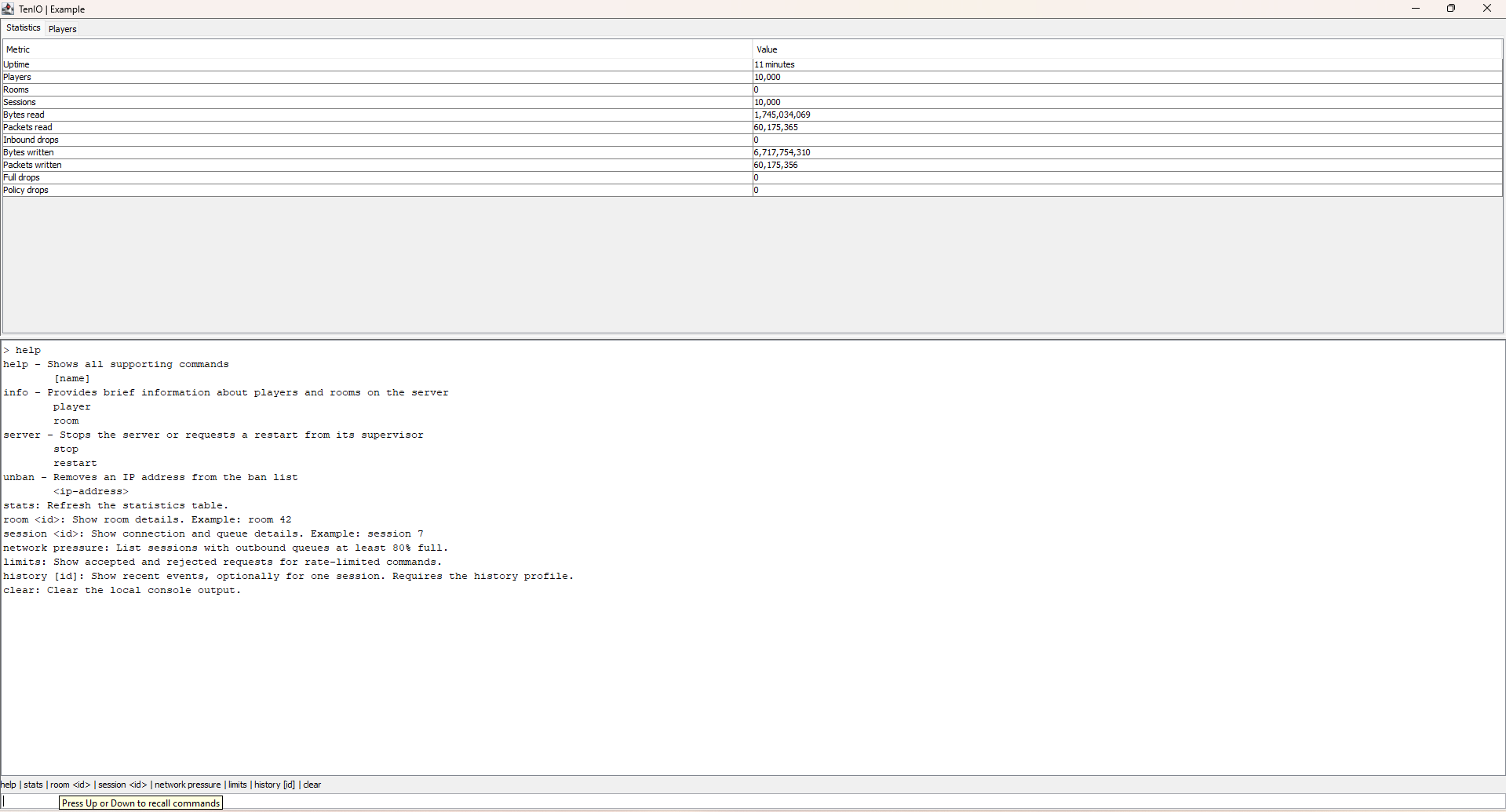
The Statistics tab shows uptime, players, rooms, sessions, traffic, and packet-drop counters. The Players tab charts recent connected-player samples. Enter commands at the bottom; use Up/Down to recall them and clear to clear the output.
| Try this | Inspect |
|---|---|
help |
Available inspection and registered system commands. |
stats |
Refresh the statistics table. |
session 1 |
Connection details, queue depth, and recorded drop or rejection counters. |
room 42 |
Room details and members. |
network pressure |
Inbound and outbound queues at least 80% full. |
limits |
Accepted and rejected requests for rate-limited client commands. |
history 1 |
Recent operational events for session 1, when history is enabled. |
Long lists show a preview. Add all, such as network pressure all or history 1 all, to open the full scrollable snapshot. Closing the monitor window leaves the server running.
Without a graphical monitor window, the history profile writes investigation records under logs/history/. The monitor is local; it does not open a remote administration endpoint. The old enable-terminal-command setting is replaced by the monitor profile.
Example 11 demonstrates custom system commands, monitoring, history, and client command limits.
| Start here | Explore |
|---|---|
| Examples 0–1 | Minimal servers, login, message handling, and codec extension points. |
| Examples 3 and 10 | TCP login with UDP registration and ZeroMap or MsgPack messages. |
| Examples 2, 4, and 5 | Finite state machines, movement simulation, and entity/component/system patterns. |
| Examples 6–8 | TCP echo load generation, WebSocket rooms, and HTTP requests. |
| Example 11 | Desktop monitoring and custom commands. |
| Example 12 | Profile-selected components, bean factories, field injection, and event handlers. |
The examples repository includes Java clients and server configurations. Its sample compression and encryption classes are pass-through teaching placeholders. Add suitable implementations for your application.
For a Kotlin showcase, visit Lonely Dragon.
| Cocos2d-x | libGDX | Unity | Phaser |
|---|---|---|---|
 |
 |
 |
 |
These companion projects illustrate client integration. Check each project's README for its supported tools and protocol compatibility.
| Repository | Purpose |
|---|---|
| tenio | Project overview, showcases, and documentation. |
| tenio-common | Shared framework utilities. |
| tenio-core | Networking, sessions, rooms, events, configuration, scheduling, and operations. |
| tenio-engine | Game-related handlers and engine utilities. |
| tenio-examples | Runnable servers, clients, and feature demonstrations. |
- Core guide and API reference.
- Wiki and documentation directory.
- Report an issue, read the contributing guide, or join Discord.
TenIO is available under the MIT License.