
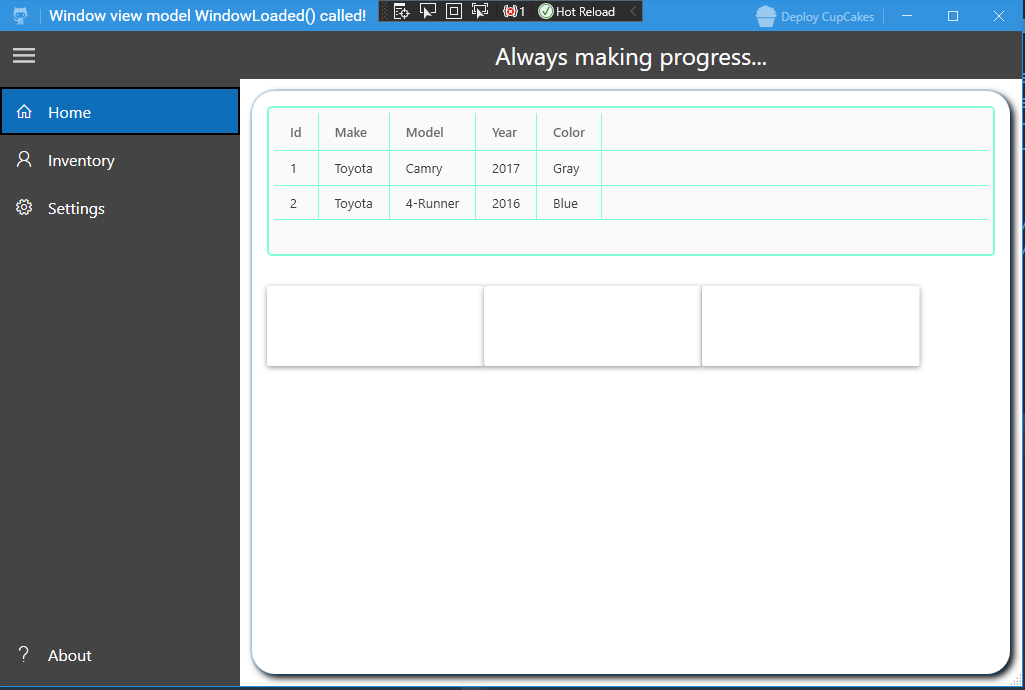
Software to manage a fictional car lot using WPF, XAML, C#, Autofac, Prism, and MVVM.
- Features
- Technology Stack
- Architecture
- Getting Started
- Project Structure
- Documentation
- Roadmap
- Contributing
- License
- Vehicle Management: Manage car inventory with properties including VIN, Make, Model, Year, and Color
- MVVM Architecture: Clean separation of concerns using the Model-View-ViewModel pattern
- Navigation System: Convention-based navigation infrastructure with dependency injection
- Modular Design: Organized into separate projects for Core domain logic, ViewModels, and Desktop UI
- Modern WPF UI: Built with Material Design and MahApps.Metro for a modern look and feel
- Hamburger Menu Navigation: Intuitive side navigation menu for accessing different modules
- Multiple Pages/Views:
- Home Page: Main dashboard and landing page
- Inventory Management: View, add, edit, and manage vehicle inventory
- Export Inventory: Export inventory data to external formats
- Sales Management: Track and manage vehicle sales
- Settings: Application configuration and preferences
- About: Application information and version details
- Dependency Injection: Full IoC container support using Autofac
- Centralized Navigation: Menu labels mapped to pages in one registration file
- Extensible Architecture: Easy to add new pages and features
- View Model Resolution: Automatic view model creation and binding via DI container
- .NET Framework 4.7.2: Target framework for Windows desktop applications
- WPF (Windows Presentation Foundation): Modern Windows desktop UI framework
- XAML: Declarative markup for UI design
- Autofac: Dependency injection and IoC container
- Prism: Framework for building loosely coupled, maintainable, and testable XAML applications
- MahApps.Metro: Toolkit for creating modern WPF applications
- Bogus: Library for generating fake data (used in development/testing)
- MVVM (Model-View-ViewModel): Primary architectural pattern
- Dependency Injection: For loose coupling and testability
- Repository Pattern: For data access abstraction (ready for implementation)
- Navigation Service: Convention-based page navigation
The solution is organized into four projects:
-
AutoLotManager.Core: Domain models and business logic
- Contains the
Carentity and core domain types - Framework-agnostic business logic
- Contains the
-
AutoLotManager.ViewModel: View Models and presentation logic
- All ViewModel classes implementing
ViewModelBase - Separated from UI concerns for testability
- Page-specific ViewModels organized by feature
- All ViewModel classes implementing
-
AutoLotManager.Desktop: WPF UI project
- XAML views and code-behind
- Navigation infrastructure (INavigationService, NavigationService)
- Startup and bootstrapping logic
- Material Design UI components
-
AutoLotManager.Tests: NUnit test project
- Unit tests for the navigation service and ViewModels
- Targets net472 to match the Desktop project, since navigation returns a WPF
Page - Run automatically by CI on every pull request
The application uses a custom convention-based navigation system:
- INavigationService: Interface defining navigation operations
- NavigationService: Implementation that handles page creation and ViewModel binding
- NavigationConfiguration: Centralized registration of all navigable pages
- Automatic ViewModel Resolution: ViewModels are resolved from the DI container and bound to views automatically
For detailed information, see NAVIGATION.md and NAVIGATION_EXAMPLE.md.
- Windows Operating System (Windows 10 or later recommended)
- Visual Studio 2019 or later (Visual Studio 2022 fully supported)
- .NET Framework 4.7.2 Developer Pack (targeting pack) or later
- NuGet Package Manager (included with Visual Studio)
-
Clone the repository
git clone https://github.com/aycee247/AutoLotManagerWPF.git cd AutoLotManagerWPF -
Restore NuGet packages
nuget restore AutoLotManager.sln
Or restore via Visual Studio: Right-click solution → Restore NuGet Packages
-
Build the solution
msbuild AutoLotManager.sln /p:Configuration=Release
Or build via Visual Studio: Build → Build Solution (Ctrl+Shift+B)
-
Run the application
- Set
AutoLotManager.Desktopas the startup project - Press F5 to run in debug mode, or Ctrl+F5 to run without debugging
- Set
AutoLotManagerWPF/
├── AutoLotManager.Core/              # Domain models and business logic
│   ├── Car.cs                        # Car entity model
│   ├── Navigation/                   # UI-free navigation seam for ViewModels
│   │   ├── IPageNavigator.cs
│   │   └── PageNavigator.cs
│   └── AutoLotManager.Core.csproj
│
├── AutoLotManager.ViewModel/         # ViewModels and presentation logic
│   ├── ViewModelBase.cs              # Base class for all ViewModels
│   ├── MainWindowViewModel.cs        # Main window ViewModel
│   ├── MainHomePageViewModel.cs      # Home page ViewModel
│   ├── Pages/                        # Feature-specific ViewModels
│   │   └── Inventory/
│   │       ├── InventoryHomePageViewModel.cs
│   │       └── ExportInventoryListPageViewModel.cs
│   └── AutoLotManager.ViewModel.csproj
│
├── AutoLotManager.Desktop/           # WPF UI project
│   ├── App.xaml                      # Application entry point
│   ├── MainWindow.xaml               # Main window with hamburger menu
│   ├── Navigation/                   # Navigation infrastructure
│   │   ├── INavigationService.cs
│   │   ├── NavigationService.cs
│   │   └── NavigationConfiguration.cs
│   ├── Startup/                      # Application bootstrapping
│   │   └── Bootstrapper.cs           # DI container configuration
│   ├── Pages/                        # All page views
│   │   ├── MainHomePage.xaml
│   │   ├── About/
│   │   ├── Inventory/
│   │   ├── Sales/
│   │   └── Settings/
│   └── AutoLotManager.Desktop.csproj
│
├── AutoLotManager.Tests/             # NUnit test project
│   ├── NavigationServiceTests.cs     # Navigation registration and behaviour
│   ├── ViewModelTests.cs             # ViewModelBase and MainWindowViewModel
│   ├── TestDoubles.cs                # Minimal Page/ViewModel stand-ins
│   └── AutoLotManager.Tests.csproj
│
├── CLAUDE.md                         # Guidance for Claude Code, incl. doc upkeep
├── CONTRIBUTING.md                   # Build, style, branching and PR flow
├── docs/adr/                         # Architecture decision records
├── README.md                         # This file
├── NAVIGATION.md                     # Navigation system documentation
├── NAVIGATION_EXAMPLE.md             # Step-by-step navigation guide
├── IMPLEMENTATION_SUMMARY.md         # Implementation details
└── AutoLotManager.sln                # Visual Studio solution file
Additional documentation is available in the following files:
- NAVIGATION.md: Comprehensive guide to the navigation infrastructure
- NAVIGATION_EXAMPLE.md: Step-by-step example of adding a new page
- IMPLEMENTATION_SUMMARY.md: Detailed implementation notes and architectural decisions
To add a new page to the application:
- Create the Page (View) in
AutoLotManager.Desktop/Pages/ - Add the new
.xamland.xaml.cstoAutoLotManager.Desktop.csproj— it is a legacy (non-SDK) project and does not pick up files automatically, so a file that is not listed there simply will not compile into the application - Create the ViewModel in
AutoLotManager.ViewModel/Pages/(SDK-style, no project edit needed) - Register the ViewModel in
Bootstrapper.cs - Register the page in
NavigationConfiguration.cs - Add a menu item in
MainWindow.xamlwhoseLabelmatches the registered key
See NAVIGATION_EXAMPLE.md for a complete walkthrough.
Each item below is tracked as a GitHub issue — follow the link for scope and implementation notes.
- Database Integration (#6): Implement Entity Framework or Dapper for data persistence
- Customer Management (#7): Add customer entity and CRUD operations
- Sales Transaction Processing (#8): Complete sales workflow with pricing and payment tracking
- Inventory Reporting (#9): Generate reports on inventory status, sales trends, and analytics
- Search & Filter (#10): Advanced search capabilities across inventory and sales
- Data Import/Export (#11): Support for CSV, Excel, and JSON formats
- Dashboard with Analytics (#12): Charts and graphs for sales and inventory metrics
- Print Functionality (#13): Print invoices, reports, and inventory lists
- Multi-Language Support (#14): Internationalization (i18n) for global use
- Themes (#15): Light/dark mode and customizable color schemes
- Responsive Design (#16): Better layout adaptation for different screen sizes
- Unit Tests (#17): Comprehensive test coverage for ViewModels and business logic
- Integration Tests (#18): End-to-end testing of key workflows
- Logging Framework (#19): Implement structured logging (Serilog, NLog)
- Error Handling (#20): Global exception handling and user-friendly error messages
- Configuration Management (#21): External configuration for app settings
- API Integration (#22): RESTful API for external system integration
- Authentication & Authorization (#23): User login and role-based access control
- CI/CD Pipeline (#24): Automated build, test, and deployment
- Code Documentation (#25): XML documentation comments for all public APIs
- Style Guide (#26): Coding standards and conventions document
- Docker Support (#27): Containerization for easier development and deployment
Speculative, not committed work — each is tracked as an issue for discussion.
- Vehicle History Tracking (#28): Maintenance records, service history, accident reports
- Photo Management (#29): Upload and display vehicle photos
- Pricing Calculator (#30): Automated pricing based on market data and vehicle condition
- Email Notifications (#31): Automated alerts for low inventory, pending sales, etc.
- Barcode/QR Code Integration (#32): Quick vehicle lookup and tracking
- Mobile Companion App (#33): MAUI-based mobile application
- Cloud Sync (#34): Multi-device synchronization via cloud storage
- Audit Trail (#35): Track all changes to inventory and sales data
- Financial Dashboard (#36): Integration with accounting systems
- Customer Portal (#37): Self-service portal for customers to view inventory
Contributions are welcome! Here's how you can help:
- Fork the repository
- Create a feature branch (
git checkout -b feature/AmazingFeature) - Commit your changes (
git commit -m 'Add some AmazingFeature') - Push to the branch (
git push origin feature/AmazingFeature) - Open a Pull Request
Please ensure your code:
- Follows the existing code style and conventions
- Includes appropriate documentation
- Works with the existing architecture
- Does not break existing functionality
This project is provided as-is for educational and demonstration purposes.
Note: This is a demonstration/portfolio project showcasing WPF, MVVM, and modern C# development practices. The "Auto Lot" is fictional, and the software is designed to demonstrate technical capabilities rather than for production use.