Repository navigation
Conversation


# Feature: Add analogue gauges (#4656)

## Summary

Adds circular, linear, and rectangular analogue gauges to `Krypton.Gauges` with a shared value/range/palette model, optional animation, and optional interactive input so dashboard-style control panels can use a matched set of indicators.

## Related issues

- Closes #4656

## Type of change

- [x] Feature / enhancement (`Implemented`)

## Changes

- `Krypton.Gauges`: shared `KryptonGaugeBase`, `GaugeValues` / face subclasses, `GaugeRange` collection, `PaletteGauge*` colours
- New toolbox controls: `KryptonCircularGauge`, `KryptonLinearGauge`, `KryptonRectangularGauge` with designers / action lists dual-compiled into `Krypton.Gauges.Design`
- TestForm: `KryptonAnalogueGaugeDemo` registered in `StartScreen`
- Standard-Toolkit-Demos: `KryptonAnalogueGauge Examples` on branch `alpha-4656-analogue-gauges` (worktree `Standard-Toolkit-Demos-4656`; main Demos tree had unrelated WIP)

## Affected packages & target frameworks

- Packages: `Krypton.Gauges` / `Krypton.Gauges.Design` (via `Krypton.Standard.Toolkit`)
- TFMs verified: suite Debug build (`net472`, `net48`, `net481`, `net10.0-windows`, `net11.0-windows`)

## Validation

- TestForm demo: `KryptonAnalogueGaugeDemo` (StartScreen: “Analogue Gauges (#4656)”).
- Manual steps:
  1. Open the demo; confirm circular / linear / rectangular / segmented faces share warning/error ranges.
  2. Drag the trackbar; indicators ease when Animate is on.
  3. Enable Interactive (or drag the dedicated interactive circular gauge); pointer and keyboard change `Value`.
  4. Use the property-grid selection buttons to inspect `Values` / `State###`.
- Demos: `Krypton Analogue Gauge Examples` on `alpha-4656-analogue-gauges`.
- Build: `dotnet build ".\Source\Krypton Components\Krypton Toolkit Suite 2022 - VS2022.sln" -c Debug`

## Screenshots / GIFs

## Changelog

- Entry added to `Documents/Changelog/Changelog.md`:

```markdown
- Implemented [#4656](#4656), Analogue gauges in `Krypton.Gauges`: circular needle, linear bar, and rectangular (solid or segmented) indicators that share value/range/palette settings, optional animation, and optional interactive input. Included in the [Krypton.Standard.Toolkit](https://www.nuget.org/packages/Krypton.Standard.Toolkit) package.
```

## Breaking changes & migration

None.

## Developer documentation

- `Documents/Development/Krypton-Analogue-Gauges.md` (local; not for the PR)

## Build log

## Checklist

- [x] Builds for `net472` and is C# 7.3 compatible where required
- [x] New compiler/analyzer warnings in touched code addressed
- [x] `Documents/Changelog/Changelog.md` updated
- [x] TestForm demo added or updated (features / observable bug fixes)
- [x] `Documents/Development/` guide added (substantial features)
- [x] Screenshots/GIFs included (UI changes)
- [x] Build log screenshot included
- [x] Breaking-change impact and TFM notes documented above
 PWagner1
added
version:120-lts


Contributor
|
@PWagner1 |
Contributor
Add thermometer and AC/DC ampere-meter controls with configurable scales, ranges, input, rendering, and designer support. Extend the analogue gauge demo and update the changelog.

Member
Author
Done 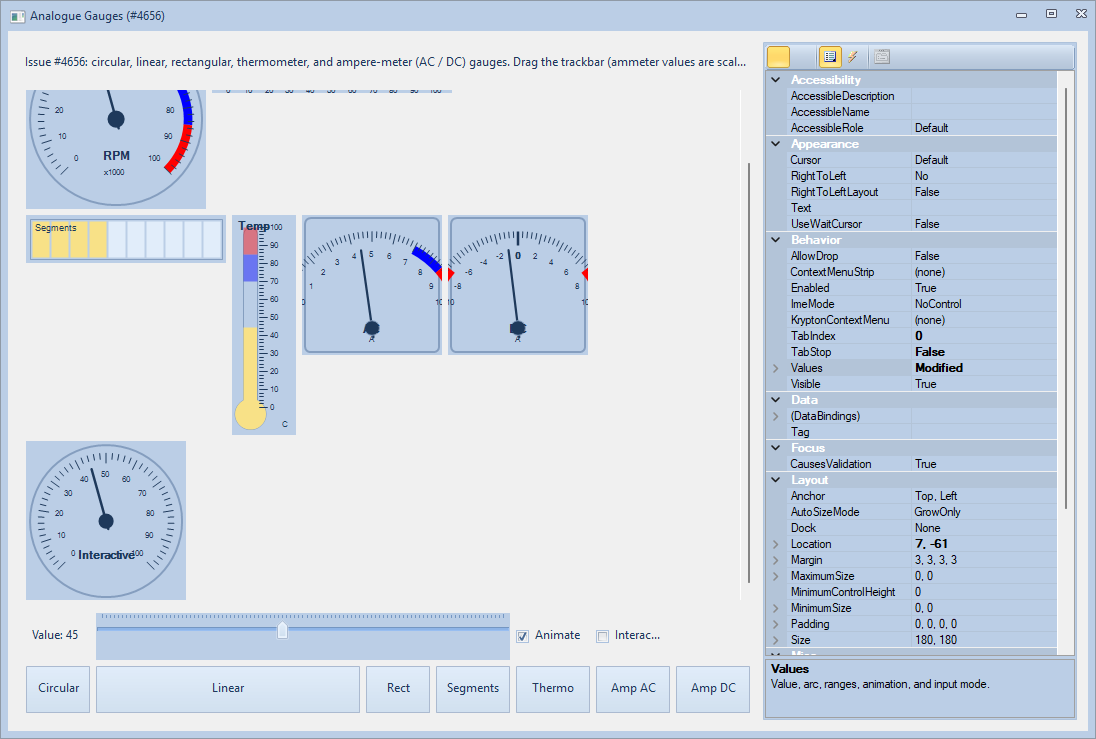
|

Member
Would like too see what this looks like in the Dark Themes before allowing it through (i.e. there are still a lot of controls that do not work correctly in the "dark"!!) |

Member
Author
Contributor
|
create an onging ticket .... i would say... |
Update screenshot guidance and the PR template to require light and dark captures for UI changes. Extend the analogue gauge screenshot script and its documentation to produce both palette variants.
Member
Author
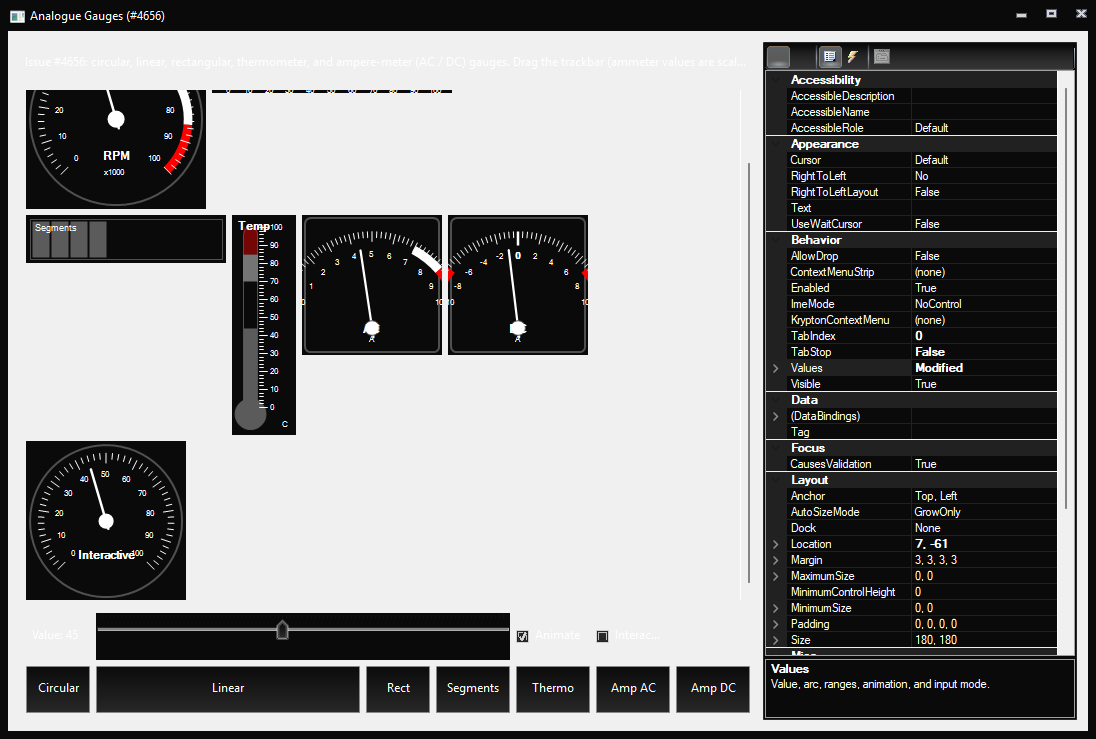
Contributor
Member
Author
I've put it in #4680 |

Smurf-IV
approved these changes
Nov 7, 2026
 Smurf-IV
left a comment
Smurf-IV
left a comment
Member
There was a problem hiding this comment.
Thanks for the images,
Just noticed: Why is the text in the buttons not fully central On the vertical axis ?
This branch has not been deployed
This file contains hidden or bidirectional Unicode text that may be interpreted or compiled differently than what appears below. To review, open the file in an editor that reveals hidden Unicode characters.
Learn more about bidirectional Unicode characters
Sign up for free
to join this conversation on GitHub.
Already have an account?
Sign in to comment


Add this suggestion to a batch that can be applied as a single commit.This suggestion is invalid because no changes were made to the code.Suggestions cannot be applied while the pull request is closed.Suggestions cannot be applied while viewing a subset of changes.Only one suggestion per line can be applied in a batch.Add this suggestion to a batch that can be applied as a single commit.Applying suggestions on deleted lines is not supported.You must change the existing code in this line in order to create a valid suggestion.Outdated suggestions cannot be applied.This suggestion has been applied or marked resolved.Suggestions cannot be applied from pending reviews.Suggestions cannot be applied on multi-line comments.Suggestions cannot be applied while the pull request is queued to merge.Suggestion cannot be applied right now. Please check back later.
Feature: Add analogue gauges (#4656)
Summary
Adds circular, linear, and rectangular analogue gauges to
Krypton.Gaugeswith a shared value/range/palette model, optional animation, and optional interactive input so dashboard-style control panels can use a matched set of indicators.Related issues
Type of change
Implemented)Changes
Krypton.Gauges: sharedKryptonGaugeBase,GaugeValues/ face subclasses,GaugeRangecollection,PaletteGauge*coloursKryptonCircularGauge,KryptonLinearGauge,KryptonRectangularGaugewith designers / action lists dual-compiled intoKrypton.Gauges.DesignKryptonAnalogueGaugeDemoregistered inStartScreenKryptonAnalogueGauge Exampleson branchalpha-4656-analogue-gauges(worktreeStandard-Toolkit-Demos-4656; main Demos tree had unrelated WIP)Affected packages & target frameworks
Krypton.Gauges/Krypton.Gauges.Design(viaKrypton.Standard.Toolkit)net472,net48,net481,net10.0-windows,net11.0-windows)Validation
KryptonAnalogueGaugeDemo(StartScreen: “Analogue Gauges ([Feature Request]: Analogue Gauges #4656)”).Value.Values/State###.Krypton Analogue Gauge Examplesonalpha-4656-analogue-gauges.dotnet build ".\Source\Krypton Components\Krypton Toolkit Suite 2022 - VS2022.sln" -c DebugScreenshots / GIFs
Changelog
Documents/Changelog/Changelog.md:Breaking changes & migration
None.
Developer documentation
Documents/Development/Krypton-Analogue-Gauges.md(local; not for the PR)Build log
Checklist
net472and is C# 7.3 compatible where requiredDocuments/Changelog/Changelog.mdupdatedDocuments/Development/guide added (substantial features)