


HowDone answers “How done is this Markdown?” It is a local, cross-platform
Node.js/TypeScript project published in two packages: howdone is the
framework-independent hexagonal core, and howdone-cli is the primary product
and command-line executor.
Its command names are howdone and howdone-cli,
with howdone as the primary command. It analyzes
hierarchical Markdown task lists, calculates overall and per-level completion,
and never modifies or uploads the source file.
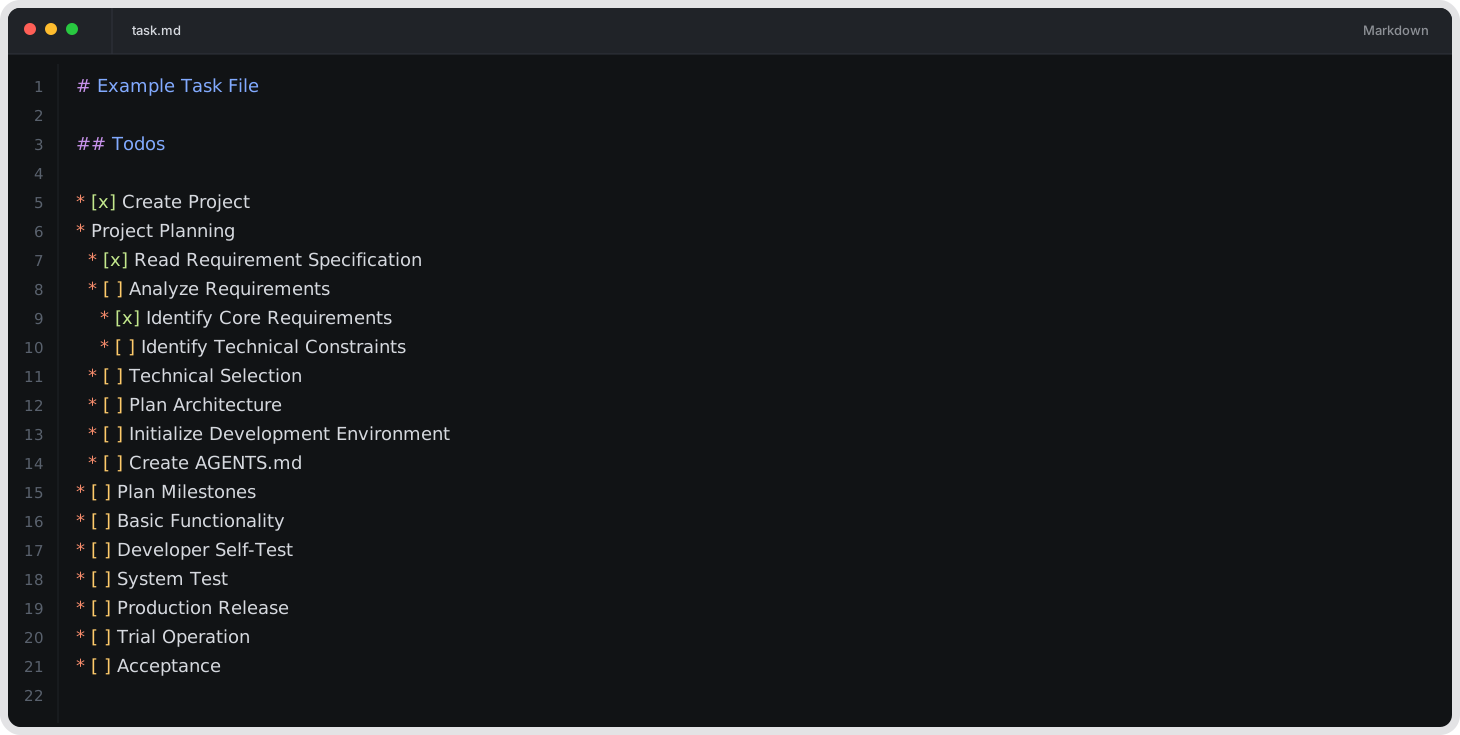
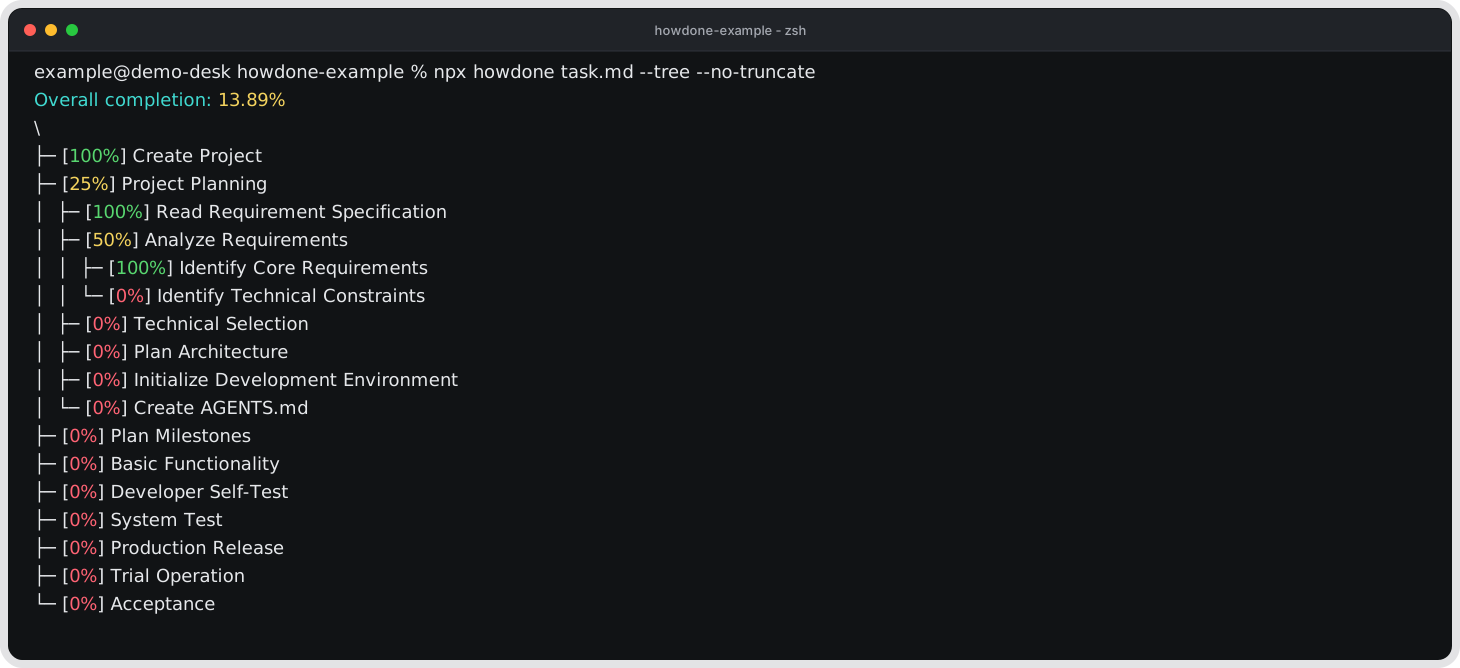
The editor and terminal images are illustrative, editable SVG mockups of the user-facing workflow. They are based on the current example and output format, so they reflect the current relationship between a Markdown checklist and its report. They are not captured screenshots, but they should be updated when the user-facing output changes.
HowDone measures the completion of the recognized checklist items in a Markdown document. It does not measure project progress. The result is a deterministic structural signal: it reflects checked and unchecked checklist items and the way their nested branches are aggregated. Task size, effort, scope, dependencies, quality, risk, and work that is not written in the checklist are outside its input. Treat the result as a rough view of checklist state, and combine it with human judgment and other project signals.
AI agents commonly write plans and status updates as Markdown checklists. Reading those files as plain text, or writing a one-off script for each new shape, can produce inconsistent results-especially with multiple levels of nesting and with a checkbox on an item that also has children. HowDone parses the Markdown structure and applies the same explicit calculation model every time.
HowDone uses the standard GFM Task List extension supported by GitHub; it does not invent a new checklist language. The syntax contract documents the recognized forms and their edge cases.
A small agent skill or prompt can guide an agent to emit a stable subset when deterministic, machine-readable checklist completion matters, while human authors remain free to use their preferred supported Markdown style.
Run this from the HowDone checkout. The command builds both packages and installs the matching local Core and CLI:
npm run install:local
howdone task.md
howdone-cli task.md
Both packages come from the checkout. If your system does not expose global
commands directly, prefix the commands with npx:
npx howdone-cli task.md
npx howdone task.mdRun this in the project where you want to use the published CLI:
The published CLI installs its matching Core automatically.
npm install howdone-cli
npx howdone-cli task.md
npx howdone task.md
npm downloads the published howdone-cli and its matching published Core.
npm install --global howdone-cli
howdone task.md
howdone-cli task.md
Use the commands directly when your system exposes global npm binaries.
npx howdone-cli task.md
npx howdone task.md
Run npx howdone-cli task.md once first so npx registers the CLI package;
after that, both command names are valid. The published CLI automatically
installs its matching published Core dependency.
npm install howdoneThis installs only the published Core for use as a library.
It does not install either CLI command. The CLI commands are howdone and
howdone-cli.
Node.js 18.18 or newer is required.
The howdone package is HowDone's framework-independent hexagonal Core. Its
source contracts and policies are in src/core/, its package
entry is packages/core/, and the public API is defined in
docs/api.md. The Core does not construct the default CLI
adapters; another project supplies the external Ports when it uses the package.
The dependency-free standard implementation for the replaceable AST parser Port
is available from howdone/std, and any replaceable Port can be substituted by
the consumer.
The Core application can be composed from another project like this:
import {run} from "howdone/application";

const exitCode = await run(argv, io, dependencies);
The io and dependencies objects are supplied by the consuming project.
Their required contracts and the complete composition example are in the
Core API.
The CLI has four independent commands. Only the first command reads and analyzes a Markdown file:
howdone <markdown-path> [options]
howdone --help
howdone --version
howdone --dependencies
The Markdown analysis command accepts the primary output and display options
below. The other three commands are standalone and cannot be combined with a
Markdown path or primary analysis options. The global output options
--silent, --strict, --no-color, and --no-pager are accepted by all four
command forms.
| Standalone command | What it does |
|---|---|
--help, -h |
Prints the CLI help. |
--version, -v |
Prints the CLI version. |
--dependencies |
Prints direct runtime dependencies, one name@version per line.It does not read a Markdown file. |
The path form accepts one .md or .markdown path. Value options accept both
--option value and --option=value. For complete CLI command and parameter
behavior, read the CLI guide. The syntax contract
defines the source and result languages, including frontmatter and JSON mapping.
The command accepts one Markdown path and the following options. Options may be
written before or after the path. A path containing spaces may be quoted by the
shell. Value options also accept --option=value. Use the path delimiter --
before a path that begins with -.
| Option | What it does |
|---|---|
<markdown-path> |
Reads one .md or .markdown file. |
--format decimal|percentage, --decimal, --percentage |
Selects the numeric format. |
--precision N |
Selects decimal places. |
--show-trailing-zeros, --no-trailing-zeros |
Controls trailing zeroes. The keep/trim aliases are also accepted. |
--tree, --details, --json |
Selects the report form. |
--max-label-clusters N, --no-truncate |
Controls label truncation. |
--merge-frontmatter, --frontmatter-weight N |
Controls frontmatter composition and weighting. |
-- (path delimiter) |
Ends option parsing so the following value is treated as the Markdown path. |
These are primary command options: they apply only to
howdone <markdown-path> [options]. The three standalone information commands
do not accept them.
Global options apply to the Markdown command and to --help, --version, and
--dependencies:
| Option | What it does |
|---|---|
--silent, -s |
Suppresses warning diagnostics; errors remain visible. |
--strict |
Converts warning conditions into errors. |
--no-color |
Disables terminal and JSON colors. |
--no-pager |
Disables the in-process terminal Pager. |
Typical invocations are:
# Print the default percentage, or one percentage per source component.
howdone tasks.md
# Show the statistical tree.
howdone tasks.md --tree
# Show the tree without truncating labels.
howdone tasks.md --tree --no-truncate
# Emit one JSON document for command-line pipelines.
howdone tasks.md --json
# Extract incomplete roots and their progress with jq.
howdone tasks.md --json |
jq '
  def pending:
    . as $node
    | [($node.children // [])[] | pending] as $children
    | if ($node.progress < 1) or ($children | length > 0) then
        {
          label: $node.label,
          progress: (($node.progress * 10000 | round) / 100),
          children: $children
        }
      else
        empty
      end;

  {
    progress: .progress.percentage,
    explicitCheckboxCount: .progress.explicitCheckboxCount,
    roots: [.progress.roots[] | pending]
  }
'
# Merge frontmatter into the Markdown tree.
howdone tasks.md --merge-frontmatter --tree
# Merge frontmatter with an explicit frontmatter weight.
howdone tasks.md --merge-frontmatter --frontmatter-weight 0.5
The CLI guide covers terminal color, Pager, diagnostics, and other invocation details.
HowDone can:
- measure GFM task-list completion in ordinary Markdown;
- preserve task hierarchy in a statistical tree;
- ignore checkbox-looking text outside recognized task-list structures;
- read YAML and TOML frontmatter as independent checklist sources;
- show a percentage, tree, details, or machine-readable JSON;
- keep frontmatter and Markdown separate or explicitly merge them; and
- produce output suitable for shell pipelines and tools such as
jq.
Remark parses Markdown into mdast. The Remark adapter maps only the relevant list structure to a small library-independent document model. The core then applies these rules:
- A task list item with no statistical children is a leaf: checked is
1, unchecked is0. - A list item in either an ordered or unordered Markdown list with statistical children is a Markdown branch. Its children may be Markdown branches or leaves; its own checkbox state is ignored, and its progress is the average of its children.
- A plain list item with task descendants becomes an implicit statistical node.
- A plain list item, and any plain subtree, with no task descendants is discarded.
- Root nodes have equal weight.
- Headings, ordinary paragraphs, code blocks, tables, HTML comments, and frontmatter strings do not create Markdown task nodes.
YAML and TOML frontmatter are optional checklist sources in addition to the
Markdown body. HowDone recognizes boolean values, named name/done records,
and child containers according to each format's data model. Section names such
as checklist and tasks have no special meaning.
Frontmatter is recognized only as a top-level prefix. A delimiter-shaped block after Markdown body content remains ordinary Markdown. Each section is kept in source order and calculated separately from the body; multiple source components expand by default, while an explicit merge can combine all frontmatter sections and the body when the source shape permits it.
The complete source and result language, including valid Markdown, YAML, TOML,
and JSON mappings, is in docs/syntax.md.
HowDone is licensed under the Apache License 2.0.
Copyright 2026 JeongHan-Bae.
For architecture, development, testing, release, and contribution details,
see the development guide, AGENTS.md, and
the contribution guide. The CLI guide and
syntax contract are included in the published
howdone-cli package.