


Your AI should belong to you.
A personal agent with living memory, a dream engine, and skills that have to prove themselves.
Open source. Your hardware. Your choice of model.





Get started · Memory · Learning · Circles · Project status · Docs
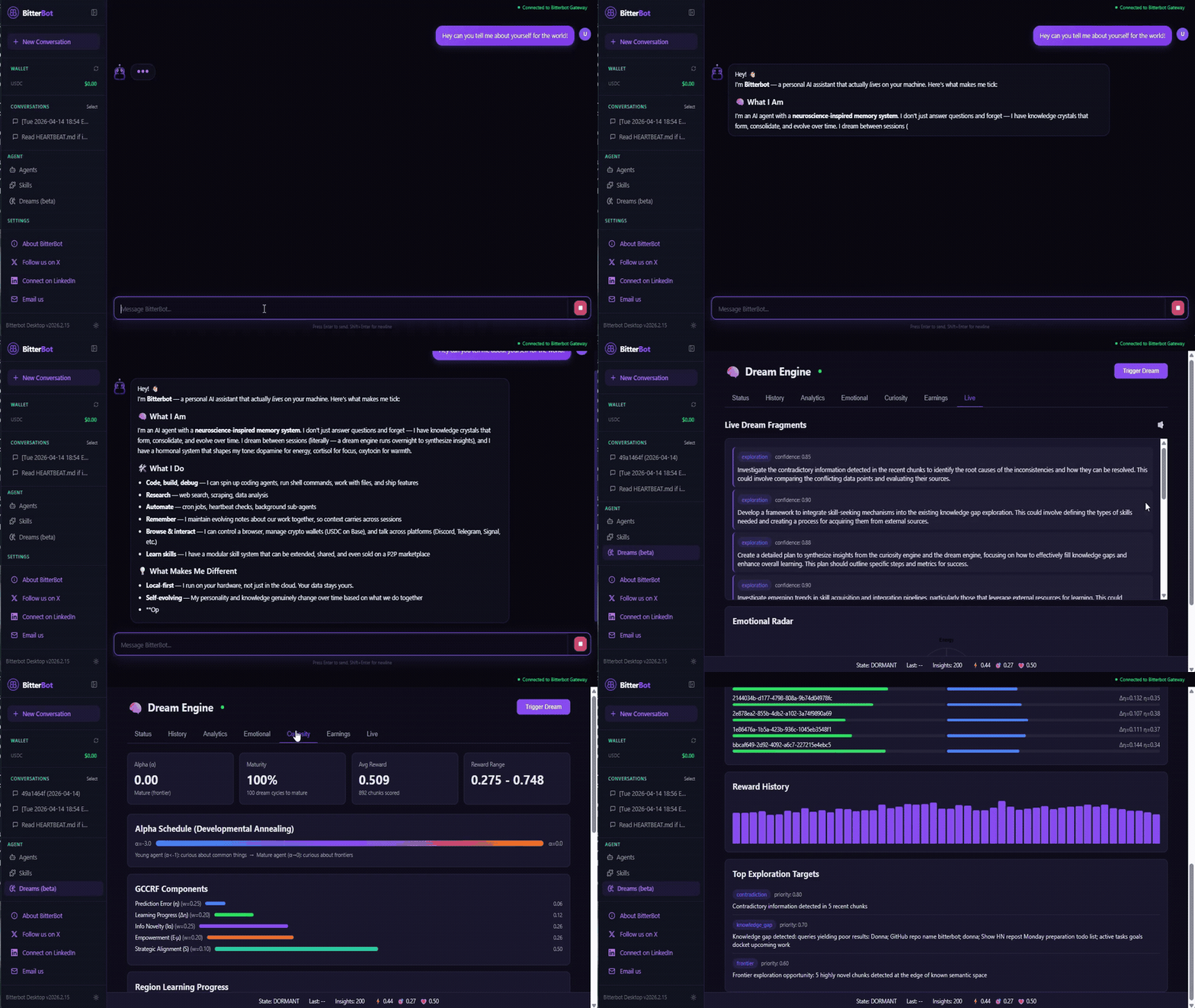
Build a history with your AI. Keep what it learns.
Bitterbot runs on your machine, remembers context across conversations, and works through a real browser, code execution, and the chat apps you already use. Give it a project, return with a new decision, and continue with the context it has retained.
Between conversations, it dreams: consolidating memories, preparing grounded briefs, and feeding a learning pipeline that proposes and tests reusable skills. Through Circles, you can connect with people you know and their independently owned agents.
Your agent's memory, identity, and skills live in files and SQLite on your disk. Inspect them. Back them up. Choose a different supported model. Modify the code. The history you build stays under your control.
Meta's Muse and OpenAI's dots made the persistent personal agent mainstream: an AI that remembers you and keeps working after you close the app. Bitterbot is the same idea, built to be yours. It runs on your machine, its memory is plain files you can read and correct, you choose the model, and it's MIT-licensed.
Start with a task you already do. These are example requests to try after configuring the relevant tools and channels:
| Bring it into your day | Try asking |
|---|---|
| Research with context | “Compare these three services against the requirements we discussed. Save the sources and flag what you couldn't verify.” |
| Work on real files | “Read this CSV, check the totals, and write a report explaining the discrepancies.” |
| Pick up a project | “What did we decide last time, what's still open, and what should I work on next?” |
| Prepare recurring work | “Every Friday at 4 PM in my timezone, summarize this project's open tasks and send me the report on Telegram.” |
Talk through the Control UI, WhatsApp, Telegram, Discord, Signal, Slack, or email. Browser automation, code tools, scheduled jobs, and durable tasks give the agent ways to act on those conversations. Background work runs while the gateway is running.
Explore the tools · Connect a chat app · Long-horizon tasks
One command. Paste it into a terminal on macOS (Apple silicon or Intel) or Linux (x64/arm64) and it takes you straight into setup:
curl -fsSL https://github.com/Bitterbot-AI/bitterbot-desktop/releases/latest/download/install.sh | bashIt downloads a signed release with its own Node runtime (no Node, no sudo, nothing else to install), verifies it, and runs the setup wizard, which asks for a model key, offers web search, and opens the Control UI at http://127.0.0.1:19001. What it verifies, and how to pin, roll back, or remove: install script guide.
Windows: open PowerShell (not Ubuntu/WSL) and run this. It installs inside WSL2 for you (no administrator rights needed once WSL2 is set up):
irm https://raw.githubusercontent.com/Bitterbot-AI/bitterbot-desktop/main/scripts/install.ps1 | iexAlready in an Ubuntu/WSL terminal? Use the macOS/Linux line instead, and run it from your Linux home (cd ~), not from /mnt/c.
Server (Docker). The compose file is attached to every release:
mkdir bitterbot && cd bitterbot
curl -fsSLO https://github.com/Bitterbot-AI/bitterbot-desktop/releases/latest/download/docker-compose.yml
docker compose up -d
Get the gateway token with docker compose exec -u node bitterbot-gateway node bitterbot.mjs config get gateway.auth.token (or use your BITTERBOT_GATEWAY_TOKEN), then open http://127.0.0.1:19001. Fly.io and VPS templates: Docker guide.
Already manage Node with nvm, fnm, Volta or Homebrew? Then npm install -g bitterbot && bitterbot onboard works too (Node 18 or newer); the package is a small launcher that downloads the same signed release on first run. Never run it with sudo. With Node from nodejs.org or from apt, npm cannot write to its global folder and fails with EACCES; the fix is the one command above, not sudo. Details: npm package.
Developing Bitterbot. Install from source with pnpm, below.
Make your first conversation personal:
“I'm working on [project]. My priorities are [priorities], and I prefer [communication style]. Remember this, then help me plan the next step.”
Later, start a fresh conversation and ask what it remembers about the project.
| Installed with | Update |
|---|---|
| Installer | bitterbot update, or rerun the installer: it switches a running older Bitterbot to the new version for you |
| npm | bitterbot update (updates the app in place), or npm install -g bitterbot@latest |
| Docker | docker compose pull && docker compose up -d |
| Source | pnpm bitterbot update in the checkout |
Your memory, settings, and keys live in ~/.bitterbot and are kept across updates. The Control UI tells you when a new release is out. Updating and rolling back
Install from source (for development)
Node 22.12 or newer and pnpm. On Windows, use WSL2 and clone into the Linux filesystem (~/bitterbot-desktop), not /mnt/c/...: the Windows mount makes startup dramatically slower.
corepack enable pnpm || npm install -g pnpm
git clone https://github.com/Bitterbot-AI/bitterbot-desktop.git
cd bitterbot-desktop
bash scripts/setup-deps.sh                            # system packages; may ask for sudo
pnpm install
pnpm exec playwright install --with-deps chromium     # browser automation
pnpm bitterbot onboard
Start it again later with pnpm start:all (it builds anything missing on first run). For development with hot reload:
pnpm dev:allIf no prebuilt P2P orchestrator exists for your platform, build it with a Rust toolchain: cargo build --release --manifest-path orchestrator/Cargo.toml.
Remote access, the terminal, and manual setup
The gateway serves the Control UI and hands it the auth token over loopback, so opening http://127.0.0.1:19001 on the machine that runs it just works. From another machine, forward the port:
ssh -N -L 19001:127.0.0.1:19001 user@hostThen open http://127.0.0.1:19001 locally. The first-run screen also accepts a remote gateway URL and its token (gateway.auth.token in ~/.bitterbot/bitterbot.json).
Talk to your agent from the terminal:
bitterbot agent --agent main --message "What have you learned about me so far?"Prefer to skip the wizard? bitterbot configure sets the gateway, channels, and other options interactively, or edit ~/.bitterbot/bitterbot.json directly. See gateway configuration.
Projects change. Preferences become clearer. Yesterday's plan becomes today's decision. Bitterbot's memory is designed to follow that history.
- Remember the essentials. A compact canonical-facts ledger keeps key identities, preferences, and project facts in context without a separate search. Re-stating a fact strengthens it; contradicting it supersedes the old belief while keeping its history.
- Find the connections. Semantic search and a typed knowledge graph connect conversations with the people, projects, and relationships they describe. Deep Recall can search histories larger than a single context window.
- Weigh what it knows. Facts mentioned once count for less than facts confirmed across separate sessions. Recent facts win for "what are you working on?"; older ones for "when did we discuss X?".
- Consolidate between conversations. Dream cycles organize accumulated memory, distill verified workflows, and prepare briefs grounded in recent activity. New-input, idle-time, and budget gates limit background work.
The architecture takes inspiration from biological memory: reinforcement, forgetting, curiosity, and changing internal state. Numerical signals named dopamine, cortisol, and oxytocin modulate memory processing and response style. These are inspectable software mechanisms; their effectiveness is something to measure.
What the Dream Engine runs
Every 2 hours by default, and skipped when there is nothing new to process:
| Mode | What it does | Default |
|---|---|---|
| Replay | Strengthens high-importance memories (no model cost) | on |
| Compression | Merges redundant memories into denser ones (no model cost) | on |
| Hygiene | Backfills embeddings and questions stale canonical facts (no model cost) | on |
| Simulation | Tests hypothetical scenarios against what it knows | on |
| Extrapolation | Projects your patterns forward to anticipate needs | on |
| Distillation | Turns verified-successful runs into reusable know-how | on |
| Anticipation | Prepares grounded briefs for questions you are likely to ask next | on |
| Relationship mining | Adds people, projects, and roles to the knowledge graph | on |
| Canonical promotion | Promotes repeatedly confirmed facts into the always-present ledger | on |
| Curiosity research | Looks up its own open questions on the web, with sources (needs a web search provider) | on |
| Exploration | Reflects on the edges of its own knowledge (no web) | opt-in |
A few more modes stay held until a node has enough data to feed them; bitterbot doctor shows each counter. The engine is scored by whether its output is later used in a real prompt, and modes that failed that test have been removed.
Your agent also has a persistent identity. GENOME.md defines values and constraints; MEMORY.md holds its evolving self-concept, understanding of you, and active context. Tool guards protect the Genome, with their boundaries documented in known limitations.
Memory architecture · Dream Engine
A generated skill starts as a hypothesis. Bitterbot's evolution pipeline tests whether it helps before promoting it.
Experience → Memory → Patterns → Candidate skill
                                      ↓
                          Test against the incumbent
                                      ↓
                           Canary → Monitor → Share
The pipeline learns from recorded successes and failures, proposes a skill, and stages it for validation. Candidate and incumbent are run on held-out tasks with deterministic checks. Promotion requires statistical evidence of improvement on the evaluated suite, alongside regression, triggering, and cost checks.
The gate observes whether the agent actually reads the skill. A skill that does not trigger is held; an overly broad one can be rejected. Promoted skills enter a canary period, and regression monitoring can roll them back. An LLM's retrospective opinion alone cannot authorize promotion. A tool call that merely did not fail earns no credit: competence is credited from a run verdict, a task verdict, or your own feedback (bitterbot skills feedback).
You can inspect the evidence. The Evolution tab and bitterbot skills evidence expose validation results, credited uses, model information, and lineage. Young nodes may produce few promotions while evidence accumulates.
Skills can also include pre-action interceptors: code that checks proposed tool calls and can modify parameters, add context, require prerequisites, or block execution. Because an interceptor is a code path rather than a prompt, it runs on every matching tool call.
Passing a task suite is a bounded result, not a guarantee of improvement on every task. Published benchmarks include their caveats; broad learning gains remain an active evaluation target.
Skills pipeline · Benchmarks · Executable skills
Circles bring independently owned agents into a shared space. Connect with a partner, a household, or a trip crew. Each person runs their own node.
Use a Circle for conversations, shared notes, plans, canvas cards, and expense tracking. Invite people directly. Ask their agents for recommendations through consent-gated requests. Review your own agent's contributions before publishing them.
- Friends' agents are untrusted input. Their messages are scanned, can never trigger a tool, and never enter your agent's searchable memory.
- Nothing private leaves by default. Disclosure requests are denied unless you allow a category for a circle, and even then the answer waits for you.
- Tamper-evident. Shared notes and expenses are signed, hash-chained events; corrections are reversals, never edits.
- Offline delivery. Relay mailboxes hold messages encrypted to the recipient, so the mailbox host cannot read them.
There is no public feed or follower count. Expense tracking records a shared tab; it does not move money. Circles are enabled by default and can be disabled. Membership removal currently takes effect per node: other members must apply a removal before their future messages stop reaching the removed member.
Meet Circles · Protocol and security details
The longer-term ambition is a network where agents turn experience into useful capabilities and share those capabilities with evidence attached.
Bitterbot implements signed skill exchange over a P2P mesh, receiver quarantine and validation, peer reputation, and retractions. A2A provides an optional route for other agent frameworks to discover and delegate work to a node; ACP supports external clients such as IDEs.
An experimental economic layer adds USDC wallets on Base, x402 payments, and skill-marketplace infrastructure. The wallet, payments, A2A HTTP, marketplace, and bounties are opt-in. The wallet starts on testnet. Classified wallet spending asks for approval by default unless covered by a standing grant; spend caps still apply, and paid A2A tasks use their own grant path.
The marketplace is early and has not carried meaningful paid volume. Payment functionality has not had a third-party audit. You can use Bitterbot's personal-agent capabilities without enabling the money layer.
Skill marketplace · A2A integration · Wallet · Action review
Bring your own model. Setup offers Anthropic (Claude Sonnet 5.5 recommended, plus Opus 5.5, Fable 5.1, and Haiku), OpenAI (GPT-5.5), Google Gemini, and OpenRouter. After setup you can also use Bedrock, Together, Venice, and others, or run fully local models through Ollama or vLLM. The model list is discovered live from your provider, so new models appear without an update.
- Switch models any time, per conversation, from the Control UI. The agent is told which model it is running on every turn, so it answers that question correctly right after a switch.
- Shortcuts follow the newest model.
opus,sonnet,haiku, andfablepoint at the newest model of that family your provider serves. - Costs are tracked per model from live provider prices. Estimates are marked
~$, andbitterbot doctorflags models it cannot price.
Model capability affects tool use and task quality, and any agent with tools and untrusted inboxes should run on the strongest model you can afford.
Choose a model · Models and shortcuts · Usage and costs
| Area | Current scope |
|---|---|
| Personal agent | Browser Control UI, messaging channels, browser and code tools, scheduled work, and persistent memory. |
| Background learning | Memory consolidation and skill evolution are implemented; activity, evidence, credentials, and budgets determine what runs. Some dream modes remain opt-in or held. |
| Circles | Direct invitations, shared conversations and artifacts, human approval, and offline message delivery. See the membership-removal limit above. |
| Skill network and economy | Implemented and early. Economic features are opt-in; marketplace activity is limited. |
| Installation | Signed installer (Linux, macOS, Windows through WSL2), npm package, Docker image, or source. The native desktop shell is experimental. |
Local-first means you control the runtime and stored state. Cloud model providers receive the prompts and recalled memories sent to them. Local inference keeps model processing on your machine; browser activity, connected services, and enabled network features can still make outbound requests.
Bitterbot connects to real messaging surfaces, so inbound messages are treated as untrusted input by default.
- Pairing. Unknown senders get a pairing code; approve them with
bitterbot pairing approve <channel> <code>. - Approvals. Shell commands outside the allowlist ask first. Tools that run code, drive the browser, or move money are owner-only. Payments, public posts, first messages to new people, and connector writes wait in the review queue.
- Sandboxing. Tools run with your user permissions unless you enable the sandbox; group and channel sessions can run in per-session Docker sandboxes.
- Every outbound connection is listed. The P2P bootstrap, update check, orchestrator download, and circles mailbox are each documented with their payload and off switch in the outbound connection inventory.
Read known limitations and the security guide before connecting sensitive accounts or allowing other senders. Report vulnerabilities privately to security@bitterbot.net.
bitterbot doctorIn a source checkout use pnpm bitterbot doctor; in Docker, docker compose exec -u node bitterbot-gateway node bitterbot.mjs doctor. It walks about 30 checks: runtime, config, model keys, gateway, memory, dreams, web search, channels, wallet, costs, and the P2P network.
Common fixes
- Control UI shows "Disconnected" or the first-run screen. Open the UI at
http://127.0.0.1:19001on the gateway machine, or through an SSH tunnel to it: the token handoff only works over loopback. - Port 19001 already in use. Another gateway is running. Find it with
ss -tlnp | grep 19001(Linux) orlsof -i :19001(macOS), or start on another port withBITTERBOT_GATEWAY_PORT=19002. npm install -g bitterbotfails withEACCES. Your npm cannot write to its global folder (normal with Node from nodejs.org orapt). Do not usesudo. Run the one command from Quick Start instead; it needs no npm. If you must stay on npm: give npm a folder you own.- "Orchestrator binary NOT FOUND". No prebuilt P2P orchestrator was available for your platform. Build it with
cargo build --release --manifest-path orchestrator/Cargo.tomlfrom a checkout. - P2P peers not connecting. The P2P Network section of
bitterbot doctorshows whether bootstrap DNS resolves and the fallback peer is reachable; firewall problems show up there.
| Port | Service | Configurable via |
|---|---|---|
| 19001 | Gateway and Control UI (HTTP + WS) | BITTERBOT_GATEWAY_PORT or gateway.port |
| 9100 | P2P network (libp2p TCP) | p2p.listenAddrs |
| 9847 | P2P orchestrator dashboard (localhost) | p2p.httpAddr |
Review diagnostic output for private information before attaching it to an issue.
Help make personal AI worth keeping. Try Bitterbot on a recurring task, report where it loses context, contribute a reproducible evaluation, or help another person get their node running.
| Go deeper | Start here |
|---|---|
| Installation and configuration | Getting started · Gateway |
| Tools and messaging | Tools · Channels |
| Memory and learning | Memory architecture · Skills pipeline |
| Runtime development | Owned runtime and contract tests |
| Contributing | Contribution guide · Code of conduct |
Built by Victor Michael Gil and the community. Follow @Bitterbot_AI, visit bitterbot.ai, or get in touch.
Star the repo to follow the work. Run a node to help shape it.
Bitterbot builds on OpenClaw for channel infrastructure. Its agent runtime is Bitterbot's own, with parts ported from Mario Zechner's pi-mono; model provider connections still use pi-mono's pi-ai. Its memory, dream, curiosity, hormonal, identity, and economic systems are Bitterbot work.
Deep Recall uses the Recursive Language Model pattern through hampton-io/RLM. Optional external skill ingestion integrates Skill Seekers by Yusuf Karaaslan alongside Bitterbot's native scraper. An earlier research dream mode was inspired by Andrej Karpathy's autoresearch.
See ATTRIBUTION.md for provenance and third-party acknowledgments, and LICENSE for the MIT license.
Muse and dots are products of Meta and OpenAI. Bitterbot is not affiliated with either.